TinyFish
TinyFish exposes web automation, web search, content extraction, and remote browser-session tools to MCP-compatible AI assistants. The hosted MCP server uses OAuth 2.1, while an optional local @tiny-fish/mcp proxy supports API-key authentication for local-only, CI, and headless setups.
About
TinyFish is an MCP integration for the TinyFish Web Agent. Its hosted endpoint gives MCP-compatible assistants access to web automation, search, content extraction, run management, and remote browser-session capabilities. TinyFish also publishes an MIT-licensed TypeScript package, @tiny-fish/mcp, that acts as a local reverse proxy to the hosted MCP service rather than defining its own tools or schemas.
Key Features
- Goal-based browser automation through
run_web_automationandrun_web_automation_async, with run inspection and cancellation throughget_run,list_runs, andcancel_run. - Web search through
search, plus search-usage inspection throughget_search_usage. - Browser-rendered content extraction through
fetch_content, with usage metadata available throughlist_fetch_usage. - Remote Chrome sessions through
create_browser_session,list_browser_sessions, andclose_browser_sessionfor direct control with Playwright, Puppeteer, or Selenium. - Batch status and cancellation tools for multiple automation runs.
- Profile-aware automation can reuse saved browser context and optionally use TinyFish Vault credentials for recurring authenticated workflows.
Use Cases
TinyFish is suited to agents that need to navigate websites from natural-language goals, extract live web content, search for current information, interact with forms and authenticated applications, or hand a remote browser session to an automation framework. The async run and run-management tools are useful for longer workflows where the calling agent should start work and poll for completion later.
Compatibility
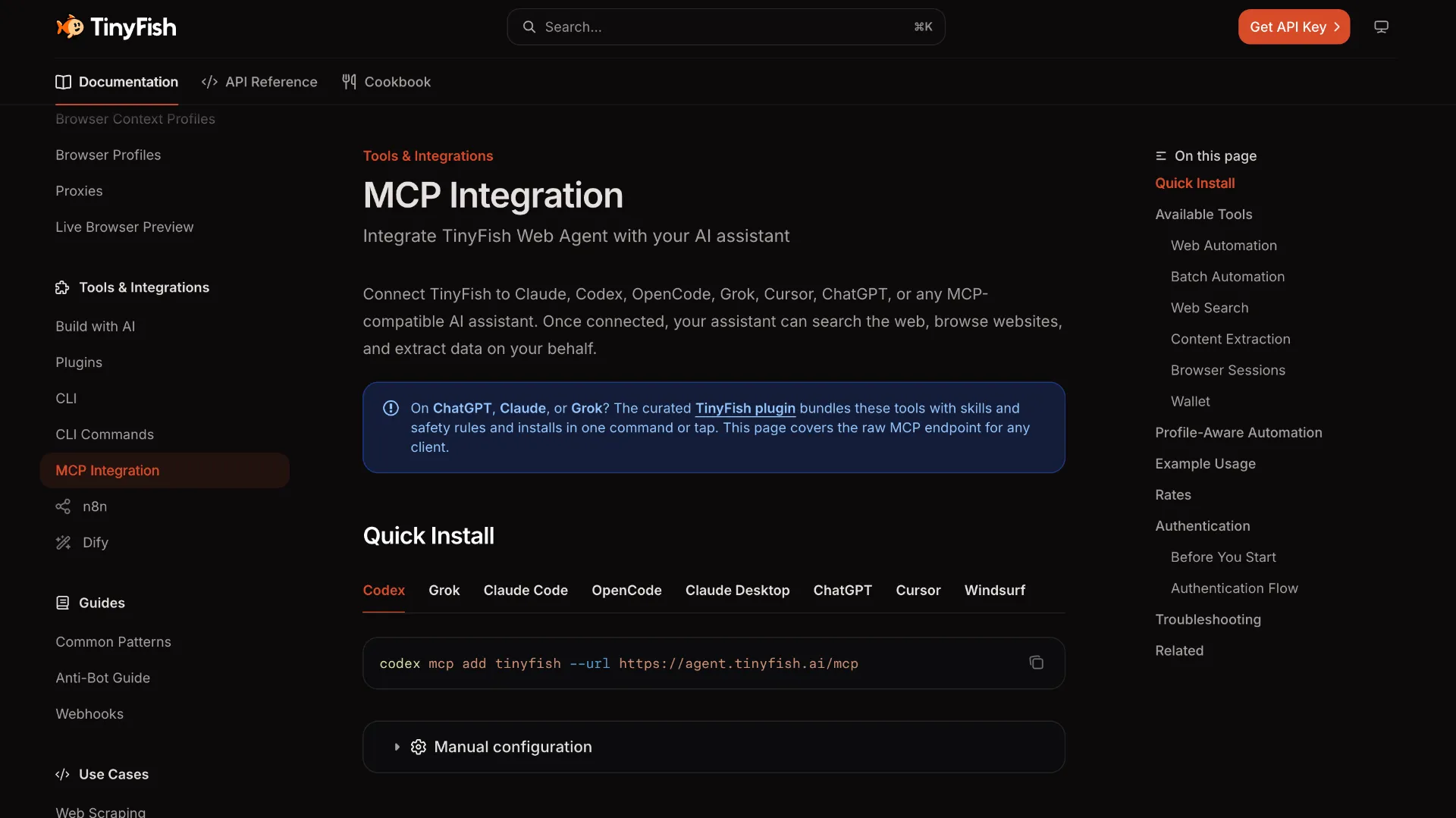
The primary service is a hosted MCP endpoint using Streamable HTTP. Current TinyFish documentation provides client-specific setup for Codex, Grok, Claude Code, OpenCode, Claude Desktop, ChatGPT, Cursor, and Windsurf, and describes the service as usable from other MCP-compatible assistants. The optional local proxy exposes a loopback HTTP MCP endpoint and the repository documents configurations for Claude Code, Claude Desktop, Cursor, VS Code, and generic URL-based MCP clients.
Limitations
- The hosted MCP flow requires a TinyFish account and OAuth 2.1 authorization; TinyFish documentation says the account must have an active subscription or credits.
- Search and content-fetch tools are free in the current pricing model, while agent automation and remote browser sessions consume TinyFish credits.
- The local
@tiny-fish/mcppackage is only a proxy to the hosted service, so it does not provide an independent offline implementation of TinyFish tools. - The local proxy requires Node.js 22 or newer and a
TINYFISH_API_KEY. It binds to loopback only, but any trusted local process able to reach its listening port can invoke automations using the server-held key. - JSON-RPC batch arrays are not supported by the hosted service according to the local proxy documentation.
Sources
- Official MCP documentation: https://docs.tinyfish.ai/mcp-integration
- Authentication: https://docs.tinyfish.ai/authentication
- Pricing: https://www.tinyfish.ai/pricing
- GitHub: https://github.com/tinyfish-io/tinyfish-mcp-server
- npm: https://www.npmjs.com/package/@tiny-fish/mcp
MCP Setup
Prerequisites
- TinyFish account with an active subscription or credits for the hosted MCP service
- An MCP client that can connect to a remote HTTP MCP server for the recommended hosted setup
- Node.js >= 22 only when using the optional @tiny-fish/mcp local proxy
- TinyFish API key only when using the optional @tiny-fish/mcp local proxy
Access requirements
- Hosted MCP authentication uses OAuth 2.1 in the browser
- The optional local proxy requires TINYFISH_API_KEY at startup and sends it upstream as X-API-Key
- Search and fetch are free in the current TinyFish pricing model; agent automation and browser sessions consume credits
Companion app or plugin
Name: @tiny-fish/mcp local proxy Install URL: https://www.npmjs.com/package/@tiny-fish/mcp
- Install globally with: npm install -g @tiny-fish/mcp
- Alternatively run without installing with: npx @tiny-fish/mcp
- Set TINYFISH_API_KEY in the environment.
- Start tinyfish-mcp and point the MCP client at http://127.0.0.1:3711/mcp.
Optional. The repository recommends the hosted endpoint directly when the client supports remote Streamable HTTP. Use the local proxy for local-only clients or API-key authentication in CI, headless machines, and scripts.
Client setup
Claude Code
Transport: http
claude mcp add --transport http tinyfish https://agent.tinyfish.ai/mcp
- Run the documented Claude Code command to add the hosted TinyFish MCP server.
Auth:
- On first use, complete the TinyFish OAuth 2.1 flow in the browser.
Hosted endpoint; no local TinyFish process is required.
Claude Desktop
Transport: http
{
  "mcpServers": {
    "tinyfish": {
      "url": "https://agent.tinyfish.ai/mcp"
    }
  }
}
- Add TinyFish as a custom connector using https://agent.tinyfish.ai/mcp, or use the documented URL-based server configuration.
- Restart Claude Desktop after editing the configuration.
Auth:
- Complete the browser OAuth flow when Claude Desktop prompts for authentication.
TinyFish recommends the direct hosted URL.
Cursor
Transport: http
{
  "mcpServers": {
    "tinyfish": {
      "url": "https://agent.tinyfish.ai/mcp"
    }
  }
}
- Add the documented TinyFish entry to Cursor MCP settings.
Auth:
- Complete TinyFish OAuth 2.1 in the browser when prompted.
Hosted endpoint.
Codex
Transport: http
codex mcp add tinyfish --url https://agent.tinyfish.ai/mcp
- Run the documented Codex command to add TinyFish.
Auth:
- Complete TinyFish OAuth 2.1 when the client requests authorization.
Hosted endpoint.
Windsurf
Transport: http
{
  "mcpServers": {
    "tinyfish": {
      "serverUrl": "https://agent.tinyfish.ai/mcp"
    }
  }
}
- Add the documented TinyFish server entry to the Windsurf MCP configuration.
Auth:
- Complete TinyFish OAuth 2.1 in the browser when prompted.
Hosted endpoint.
VS Code
Transport: http
{
  "servers": {
    "tinyfish": {
      "type": "http",
      "url": "http://127.0.0.1:3711/mcp"
    }
  }
}
- Start the optional @tiny-fish/mcp local proxy.
- Use the repository-documented .vscode/mcp.json configuration pointing to http://127.0.0.1:3711/mcp.
The repository documents this local-proxy setup for VS Code. A current VS Code-specific hosted configuration is not documented on the TinyFish MCP integration page.
Lovable
Exact public TinyFish MCP setup for Lovable is not documented.
Other
Transport: http
- Configure the hosted MCP endpoint https://agent.tinyfish.ai/mcp using the client's remote Streamable HTTP server settings.
Auth:
- Complete TinyFish OAuth 2.1 if the client supports the hosted authorization flow.
TinyFish documentation describes the endpoint as usable from MCP-compatible assistants and separately documents Grok, OpenCode, and ChatGPT. Exact configuration syntax varies by client.
Authorization flow
- Add https://agent.tinyfish.ai/mcp to a supported MCP client.
- On first use, the client opens a browser for OAuth 2.1 authorization.
- Sign in with the TinyFish account and authorize the connection.
- Authorization is cached for later sessions.
Environment variables
TINYFISH_API_KEY — required by the optional local proxyPORT — optional local proxy listen port; default 3711TINYFISH_UPSTREAM_URL — optional local proxy upstream override; default https://agent.tinyfish.ai/mcp
Setup docs: https://docs.tinyfish.ai/mcp-integration
Tags
Alternatives
Comparable tools and resources explicitly connected to TinyFish.
Related Entries
Keep exploring similar tools and resources in this category.

PaidSync.ai
MCP ServersPaidSync.ai is a hosted MCP server for paid advertising that exposes 610+ tools across 14 advertising, analytics, tagging, and commerce platforms. It supports read/write workflows from AI clients including ChatGPT, Claude, Gemini, Cursor, Claude Code, and Codex, with a free plan.

Hyper3D MCP
MCP ServersHyper3D MCP is Hyper3D's hosted Rodin MCP server for creating 3D assets from natural-language instructions or supported references, checking asynchronous generation progress, and retrieving model download links inside AI coding clients. Official setup is documented for Codex, Claude Code, and Kimi Code CLI.




Related Reads
Background, tutorials, and protocol context connected to this entry.