openaiDeveloperDocs
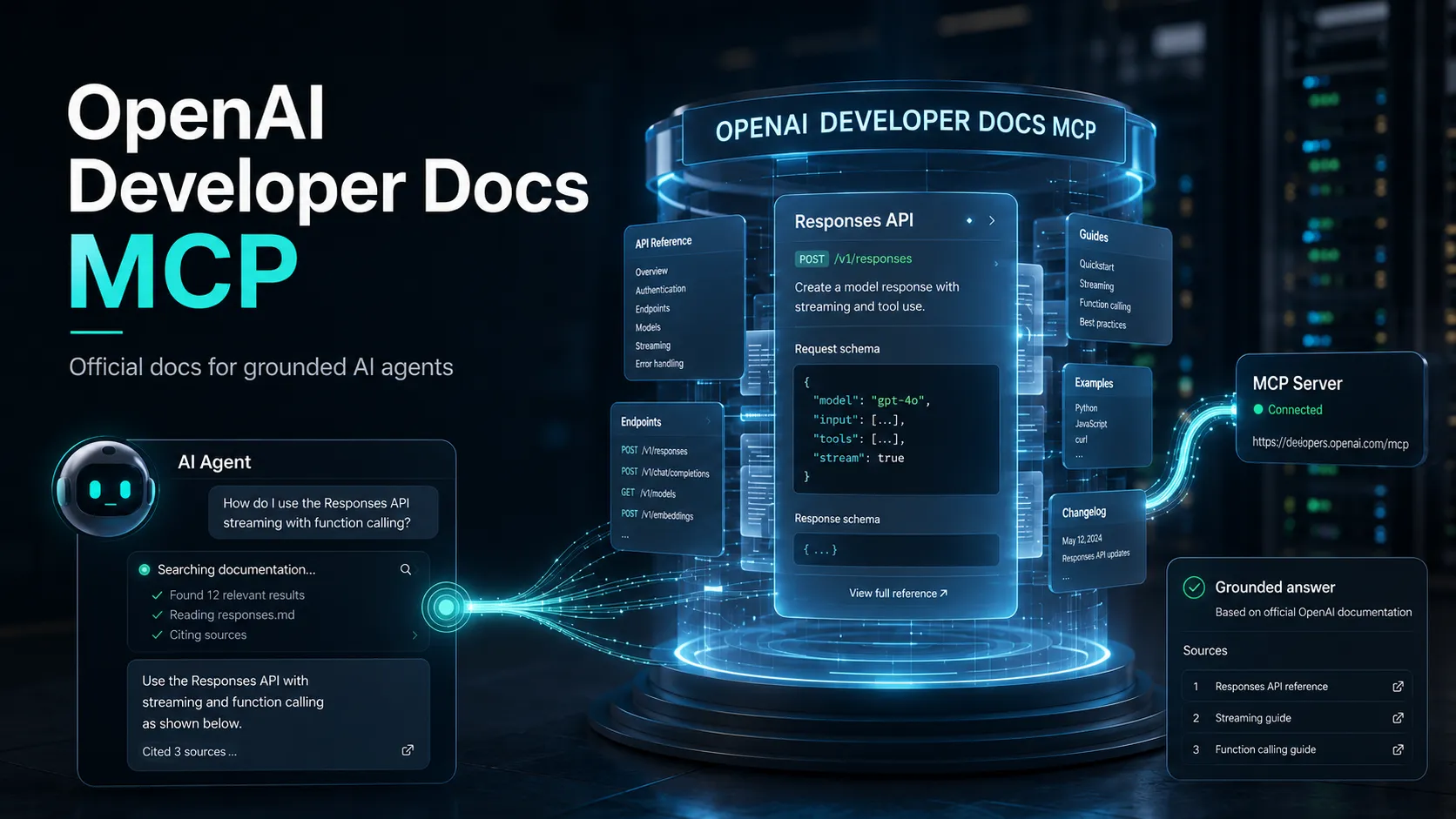
OpenAI Developer Docs MCP is an OpenAI-hosted, read-only server that lets MCP clients search and fetch documentation from developers.openai.com, platform.openai.com, and learn.chatgpt.com. It uses a public streamable HTTP endpoint and does not call the OpenAI API on the user's behalf.
About
OpenAI Developer Docs MCP is the official public documentation server hosted by OpenAI at https://developers.openai.com/mcp. It provides read-only access to documentation published on developers.openai.com, platform.openai.com, and learn.chatgpt.com, allowing an MCP-capable agent to retrieve current source material while working.
Key Features
- Searches OpenAI developer documentation and returns relevant documentation pages.
- Fetches page content so an agent can inspect and cite the underlying documentation instead of relying only on model memory.
- Official OpenAI skills document tool names including
search_openai_docs,fetch_openai_doc,list_openai_docs,list_api_endpoints, andget_openapi_spec, with some tools described as available when supported. - Uses a hosted streamable HTTP endpoint; there is no local server package or Docker image in the official quickstart.
- Can be paired with the official OpenAI Docs Skill to encourage agents to consult Docs MCP before falling back to web search.
Use Cases
- Verify OpenAI API request schemas, required fields, endpoint details, and parameter definitions.
- Retrieve current guidance for the Responses API, Agents SDK, Realtime API, Apps SDK, Codex, and related OpenAI developer products.
- Ground coding-agent answers in official documentation and preserve source traceability.
- Reduce errors caused by outdated model knowledge when OpenAI documentation changes.
Compatibility
The official quickstart documents integrations for Codex, VS Code with GitHub Copilot Agent mode, Cursor, and Claude Code. The server itself is exposed through streamable HTTP. Exact public setup instructions are not provided in the cited guide for Claude Desktop, Windsurf, or Lovable.
Limitations
- The server is documentation-only and does not call the OpenAI API or perform actions on a user's behalf.
- It is limited to OpenAI documentation sources covered by the hosted service rather than general third-party library documentation.
- No MCP prompts, prompt templates, or separately browsable MCP resources are documented in the cited official guide.
- Client behavior still depends on whether the agent selects and invokes the documentation tools; OpenAI recommends adding persistent agent guidance when reliable use is important.
Sources
- Official guide: https://developers.openai.com/learn/docs-mcp
- Hosted endpoint: https://developers.openai.com/mcp
- OpenAI Docs Skill: https://github.com/openai/skills/blob/main/skills/.curated/openai-docs/SKILL.md
- OpenAI Knowledge Skill: https://github.com/openai/openai-agents-js/blob/main/.agents/skills/openai-knowledge/SKILL.md
- Codex MCP documentation: https://learn.chatgpt.com/docs/extend/mcp?surface=cli
MCP Setup
Prerequisites
- An MCP-capable client with remote HTTP support
- Access to the client CLI or MCP configuration file
Access requirements
- OpenAI hosts the public server at https://developers.openai.com/mcp
- No API key, OAuth flow, subscription, or environment variable is documented in the official quickstart
Companion app or plugin
No companion application is required by the official quickstart.
Client setup
Codex
Transport: streamable HTTP
codex mcp add openaiDeveloperDocs --url https://developers.openai.com/mcp
[mcp_servers.openaiDeveloperDocs]
url = "https://developers.openai.com/mcp"
- Run the command in a terminal, or add the TOML configuration to ~/.codex/config.toml.
- Run codex mcp list to verify that the server is configured.
Codex CLI and the Codex IDE extension share the same MCP configuration.
VS Code
Transport: streamable HTTP
{
  "servers": {
    "openaiDeveloperDocs": {
      "type": "http",
      "url": "https://developers.openai.com/mcp"
    }
  }
}
- Create .vscode/mcp.json in the project root and add the documented configuration.
- Open GitHub Copilot Chat, switch to Agent mode, and enable the server in the tools picker.
The official guide documents VS Code support through GitHub Copilot in Agent mode.
Cursor
Transport: streamable HTTP
{
  "mcpServers": {
    "openaiDeveloperDocs": {
      "url": "https://developers.openai.com/mcp"
    }
  }
}
- Create ~/.cursor/mcp.json on macOS or Linux and add the documented configuration.
- Restart Cursor after saving the configuration.
Cursor also has an official one-click installation link from the OpenAI Docs MCP guide.
Claude Code
Transport: streamable HTTP
claude mcp add --transport http openaiDeveloperDocs https://developers.openai.com/mcp
- Run the command from the project where Claude Code should use the server.
- Run claude mcp list to verify configuration.
- Run /mcp inside Claude Code to confirm the server is connected.
For user-wide scope, the official guide adds --scope user before the server name.
Claude Desktop
Exact public setup is not documented in the official OpenAI Docs MCP guide.
Windsurf
Exact public setup is not documented in the official OpenAI Docs MCP guide.
Lovable
Exact public setup is not documented in the official OpenAI Docs MCP guide.
Other
The hosted endpoint is documented as streamable HTTP, but exact setup for other MCP clients is not documented in the official quickstart.
Setup docs: https://developers.openai.com/learn/docs-mcp
Tags
Alternatives
Comparable tools and resources explicitly connected to openaiDeveloperDocs.
Related Entries
Keep exploring similar tools and resources in this category.

PaidSync.ai
MCP ServersPaidSync.ai is a hosted MCP server for paid advertising that exposes 610+ tools across 14 advertising, analytics, tagging, and commerce platforms. It supports read/write workflows from AI clients including ChatGPT, Claude, Gemini, Cursor, Claude Code, and Codex, with a free plan.

Hyper3D MCP
MCP ServersHyper3D MCP is Hyper3D's hosted Rodin MCP server for creating 3D assets from natural-language instructions or supported references, checking asynchronous generation progress, and retrieving model download links inside AI coding clients. Official setup is documented for Codex, Claude Code, and Kimi Code CLI.




Related Reads
Background, tutorials, and protocol context connected to this entry.