Windsurf Mcp
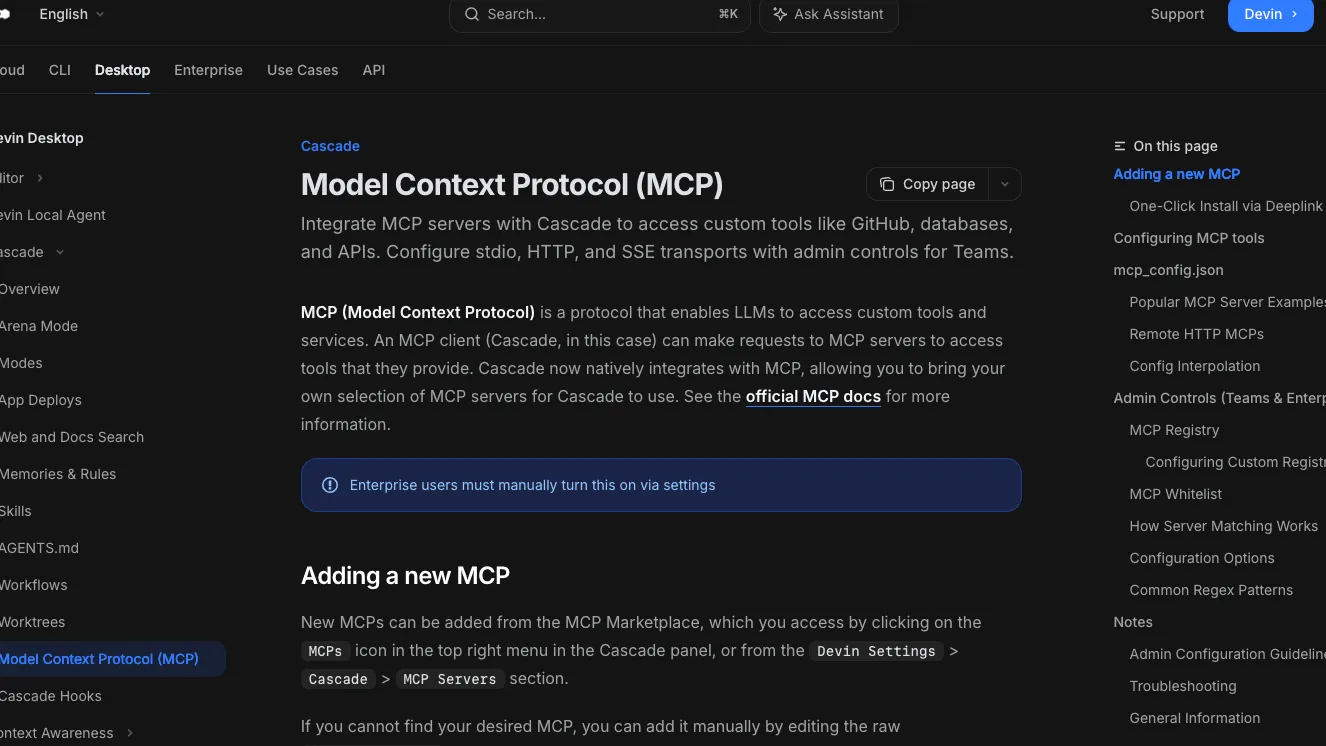
Windsurf MCP refers to the MCP client support in Cascade, now documented under Devin Desktop after Windsurf was renamed. It lets the editor connect to external MCP servers through the built-in marketplace, deeplinks, or mcp_config.json.
About
Windsurf MCP is the Model Context Protocol client integration in Cascade. The current official documentation is hosted under Devin Desktop because Devin Desktop is the new name for Windsurf.
Key Features
- Adds MCP servers from the built-in MCP Marketplace, Devin Settings, deeplinks, or raw mcp_config.json.
- Supports stdio, Streamable HTTP, and SSE transports.
- Supports OAuth for each documented transport type.
- Lets users toggle which tools from an installed MCP server are enabled in Cascade.
- Supports team and enterprise controls, including MCP access toggles, custom registries, and MCP whitelists.
Use Cases
- Connect Cascade to developer systems such as GitHub, Slack, PostgreSQL, local files, Brave Search, and memory servers when those MCP servers are configured.
- Add remote HTTP MCP servers that expose hosted tools or organization services.
- Let team admins restrict MCP usage to approved servers or custom registries.
Setup or Requirements
Setup is handled through Devin Desktop or Windsurf's MCP configuration, not through a standalone Windsurf MCP server package. See mcpSetup for the verified marketplace, mcp_config.json, transport, auth, and admin setup details.
Compatibility
The documented host is Cascade inside Devin Desktop, formerly Windsurf. The docs state support for MCP tools, resources, and prompts from configured servers.
Limitations
Windsurf MCP is not a fixed MCP server and does not expose its own universal tool list. Tools, credentials, runtime requirements, and permissions depend on each MCP server you install. Cascade has a documented limit of 100 total enabled MCP tools at any given time.
Sources
- Devin Desktop MCP docs: https://docs.devin.ai/desktop/cascade/mcp
- Windsurf legacy MCP docs: https://docs.windsurf.com/windsurf/cascade/mcp
- Devin Desktop product page: https://devin.ai/desktop/
- Devin Desktop getting started: https://docs.devin.ai/desktop/getting-started
- MCP introduction: https://modelcontextprotocol.io/docs/getting-started/intro
MCP Setup
Prerequisites
- Devin Desktop installed; Windsurf is now documented as Devin Desktop
- A Devin account is required to use Devin Desktop
- Enterprise users must enable MCP manually in settings
- For local stdio servers, the server runtime such as Node.js, npx, Docker, Python, or another documented runtime must be installed
- For remote servers, a reachable Streamable HTTP or SSE endpoint is required
Access requirements
- Authentication requirements depend on the MCP server being added
- MCP servers may require API keys, personal access tokens, bot tokens, connection strings, or OAuth
- API keys and tokens can be passed through env or headers in mcp_config.json
- One-click MCP deeplinks require the user's team to have MCP access enabled
Companion app or plugin
Name: Devin Desktop MCP Marketplace Install URL: windsurf://windsurf-mcp-registry
- Open the MCPs icon in the Cascade panel or go to Devin Settings > Cascade > MCP Servers.
- Select an MCP from the Marketplace.
- Click Install to expose that server and its tools to Cascade.
- For a direct registry page, use the documented deeplink format windsurf://windsurf-mcp-registry?serverName=<server-name>.
Official MCP entries show a blue checkmark. Marketplace availability and custom registries can be controlled by team or enterprise admins.
Client setup
Windsurf
Transport: stdio
{
  "mcpServers": {
    "github": {
      "command": "npx",
      "args": [
        "-y",
        "@modelcontextprotocol/server-github"
      ],
      "env": {
        "GITHUB_PERSONAL_ACCESS_TOKEN": "<YOUR_PERSONAL_ACCESS_TOKEN>"
      }
    }
  }
}
- Edit the raw ~/.codeium/windsurf/mcp_config.json file when the desired MCP is not available in the Marketplace.
- Add the server under mcpServers with the documented command, args, and env fields for that server.
- Provide the required arguments and environment variables for the server you want Cascade to use.
- Open the server settings from the MCPs icon in Cascade to enable or disable exposed tools.
Auth:
- Pass server-specific tokens or API keys through env.
- Use config interpolation such as ${env:VAR_NAME} or ${file:/path/to/file} to avoid hardcoding secrets.
The configBlock is the official docs' GitHub stdio example. Replace it with the verified configuration for the MCP server you actually want to use.
Windsurf
Transport: Streamable HTTP
{
  "mcpServers": {
    "remote-http-mcp": {
      "serverUrl": "<your-server-url>/mcp",
      "headers": {
        "API_KEY": "value"
      }
    }
  }
}
- Edit ~/.codeium/windsurf/mcp_config.json.
- Add the remote server under mcpServers with a serverUrl or url field.
- Set required headers documented by the remote MCP provider.
Auth:
- Pass API keys or bearer tokens through headers when required by the remote MCP server.
- Use OAuth when the remote MCP server requires OAuth and supports it in Devin Desktop.
For HTTP servers, the docs say the URL should match the endpoint and resemble https://<your-server-url>/mcp.
Windsurf
Transport: SSE
- Add the SSE server from the MCP Marketplace when available, or follow the provider's documented server configuration.
- Use the MCPs panel in Cascade to review the installed server and toggle enabled tools.
Auth:
- Use OAuth or server-specific credentials as documented by the SSE MCP provider.
SSE is documented as a supported transport, but the official MCP page does not provide a separate SSE-specific config block.
Windsurf
Transport: other
- Use the deeplink windsurf://windsurf-mcp-registry?serverName=<server-name> to open a specific MCP registry page in Devin Desktop.
- Use windsurf://windsurf-mcp-registry without a serverName to open the MCP Marketplace.
- Install the selected MCP from the registry page after reviewing its configuration.
Auth:
- Complete the selected MCP server's required OAuth or credential setup after installation.
Deeplinks require MCP access to be enabled for the user's team.
Authorization flow
- OAuth is documented as supported for stdio, Streamable HTTP, and SSE transports.
- Local stdio servers commonly receive secrets through env in mcp_config.json.
- Remote HTTP servers can receive credentials through headers.
- Config interpolation supports ${env:VAR_NAME} and ${file:/path/to/file} in command, args, env, serverUrl, url, and headers.
Environment variables
Environment variables are defined per MCP server under env in mcp_config.json.The docs show GITHUB_PERSONAL_ACCESS_TOKEN for the GitHub example, SLACK_BOT_TOKEN and SLACK_TEAM_ID for the Slack example, POSTGRES_CONNECTION_STRING for the PostgreSQL example, and BRAVE_API_KEY for the Brave Search example.Use ${env:VAR_NAME} to read a value from the process environment.Use ${file:/path/to/file} to read a trimmed secret value from a file.
Setup docs: https://docs.devin.ai/desktop/cascade/mcp
Tags
Alternatives
Comparable tools and resources explicitly connected to Windsurf Mcp.
Related Entries
Keep exploring similar tools and resources in this category.

PaidSync.ai
MCP ServersPaidSync.ai is a hosted MCP server for paid advertising that exposes 610+ tools across 14 advertising, analytics, tagging, and commerce platforms. It supports read/write workflows from AI clients including ChatGPT, Claude, Gemini, Cursor, Claude Code, and Codex, with a free plan.

Hyper3D MCP
MCP ServersHyper3D MCP is Hyper3D's hosted Rodin MCP server for creating 3D assets from natural-language instructions or supported references, checking asynchronous generation progress, and retrieving model download links inside AI coding clients. Official setup is documented for Codex, Claude Code, and Kimi Code CLI.




Related Reads
Background, tutorials, and protocol context connected to this entry.