Gemini CLI MCP
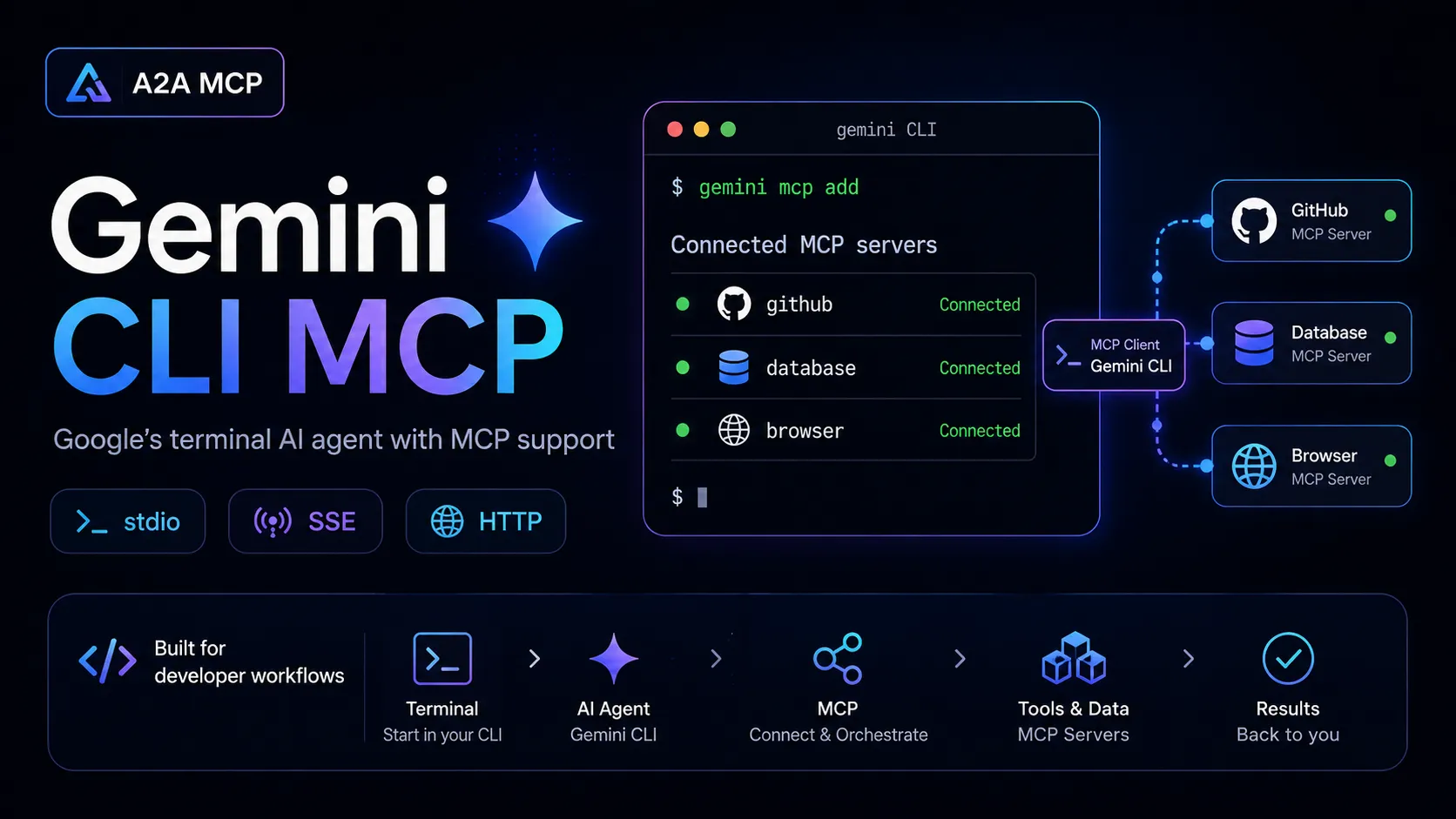
Gemini CLI is an open-source terminal AI agent with MCP client support. It connects to configured MCP servers over stdio, SSE, or Streamable HTTP to extend Gemini with external tools, resources, and prompts.
About
Gemini CLI MCP refers to the Model Context Protocol integration in Google's Gemini CLI. The official documentation describes Gemini CLI as an MCP host/client that connects to configured MCP servers; it is not documented as a standalone MCP server entry.
Key Features
- Connects to MCP servers defined in
settings.jsonthrough themcpServersobject. - Supports stdio, SSE, and Streamable HTTP MCP transports.
- Discovers MCP tools, validates schemas for Gemini compatibility, and registers them in Gemini CLI's tool registry.
- Discovers MCP resources and lets users reference resource URIs with the same
@syntax used for files. - Supports MCP prompts as slash commands when connected servers expose prompts.
- Provides
/mcpstatus, authentication, listing, enable, disable, and troubleshooting commands. - Supports environment variable expansion and environment sanitization for MCP server configuration.
Use Cases
- Add GitHub, Slack, database, browser, cloud, or custom internal MCP servers to Gemini CLI.
- Extend Gemini CLI with project-specific tools while working in a terminal.
- Test MCP server discovery, tool execution, resources, and prompts from a Google Gemini-based coding agent.
Setup or Requirements
Gemini CLI must be installed and authenticated before it can be used as an MCP host. MCP servers can be configured manually in ~/.gemini/settings.json or project-level .gemini/settings.json, or added with gemini mcp add. The exact command, URL, headers, tokens, or environment variables depend on the MCP server being connected.
Compatibility
The official MCP integration supports local stdio servers, SSE endpoints, and Streamable HTTP endpoints. Gemini CLI can also manage remote MCP server OAuth flows through /mcp auth when the server supports OAuth discovery.
Limitations
This entry is classified as a client because the official Google documentation describes Gemini CLI connecting to MCP servers, not exposing Gemini CLI itself as a server. It does not provide a universal Gemini-hosted MCP endpoint; each MCP server must be configured separately. Stdio servers are only tested and displayed as connected when the current folder is trusted.
Sources
- Gemini CLI MCP docs: https://geminicli.com/docs/tools/mcp-server/
- Google Gemini CLI GitHub repository: https://github.com/google-gemini/gemini-cli
- Gemini CLI MCP source doc: https://github.com/google-gemini/gemini-cli/blob/main/docs/tools/mcp-server.md
- GitHub MCP Server install guide for Gemini CLI: https://github.com/github/github-mcp-server/blob/main/docs/installation-guides/install-gemini-cli.md
MCP Setup
Prerequisites
- Gemini CLI installed locally using an official installation method such as npx, npm, Homebrew, MacPorts, or the documented Conda-based workflow
- Gemini CLI authenticated with Google OAuth, a Gemini API key, or Vertex AI configuration
- One or more MCP servers to connect to
- For stdio MCP servers, the current folder must be trusted for connection testing and display
Access requirements
- Gemini CLI can be used with Google OAuth sign-in, GEMINI_API_KEY, or Vertex AI environment configuration
- Remote or third-party MCP servers may require their own API keys, headers, OAuth flow, or service-specific credentials
- OAuth-protected remote MCP servers require local browser access and a localhost redirect callback
Companion app or plugin
Name: Gemini CLI Install URL: https://github.com/google-gemini/gemini-cli
- Install Gemini CLI using an official method such as
npx @google/gemini-cli,npm install -g @google/gemini-cli,brew install gemini-cli,sudo port install gemini-cli, or the documented Conda workflow. - Run
geminiand authenticate with Google OAuth, or configure Gemini API key or Vertex AI environment variables. - Configure MCP servers manually in
~/.gemini/settings.jsonor.gemini/settings.json, or usegemini mcp add. - Use
/mcpinside Gemini CLI orgemini mcp listfrom the shell to inspect configured server status.
Gemini CLI is the MCP host/client in this entry. It connects to separately configured MCP servers rather than serving as a documented standalone MCP server.
Client setup
Gemini CLI
Transport: stdio
gemini mcp add "<name>" "<command>" "[args...]"
{
  "mcpServers": {
    "serverName": {
      "command": "path/to/server",
      "args": ["--arg1", "value1"],
      "env": {
        "API_KEY": "$MY_API_TOKEN"
      },
      "cwd": "./server-directory",
      "timeout": 30000,
      "trust": false
    }
  }
}
- Install and authenticate Gemini CLI.
- Install or prepare the local MCP server executable.
- Run the documented
gemini mcp addcommand with the server name, local command, and any server args, or add acommand-based entry undermcpServersin settings.json. - Run
gemini mcp listor/mcpto verify connection status.
Auth:
- Pass server-specific secrets through the
envobject using environment variable expansion such as$MY_API_TOKEN. - Avoid hardcoding secrets directly in settings.json.
This is the default transport for running local MCP servers. Gemini CLI spawns the server subprocess and communicates over stdin/stdout.
Gemini CLI
Transport: HTTP
gemini mcp add --transport http "<name>" "<url>"
{
  "mcpServers": {
    "httpServer": {
      "httpUrl": "http://localhost:3000/mcp",
      "timeout": 5000
    }
  }
}
- Install and authenticate Gemini CLI.
- Confirm that the remote or local MCP server exposes a Streamable HTTP endpoint.
- Run
gemini mcp add --transport http <name> <url>or add anhttpUrlentry undermcpServersin settings.json. - Use
gemini mcp listor/mcpto verify connection status.
Auth:
- For bearer-token or custom-header servers, configure headers in settings.json.
- For OAuth-capable remote servers, use
/mcp author/mcp auth serverNamewhen prompted or when authentication is required.
Gemini CLI documentation calls this Streamable HTTP transport and configures it with the httpUrl property.
Gemini CLI
Transport: SSE
gemini mcp add --transport sse "<name>" "<url>"
{
  "mcpServers": {
    "sseServer": {
      "url": "https://api.example.com/sse/"
    }
  }
}
- Install and authenticate Gemini CLI.
- Confirm that the MCP server exposes an SSE endpoint.
- Run
gemini mcp add --transport sse <name> <url>or add aurlentry undermcpServersin settings.json. - Use
gemini mcp listor/mcpto verify connection status.
Auth:
- For header-based authentication, configure headers in settings.json.
- For OAuth-capable remote servers, run
/mcp author/mcp auth serverName.
Gemini CLI uses the url property for SSE MCP server endpoints.
Authorization flow
- Run
geminiand choose Google OAuth sign-in when prompted, or configureGEMINI_API_KEYfor Gemini API key access. - For Vertex AI usage, configure
GOOGLE_API_KEYandGOOGLE_GENAI_USE_VERTEXAI=trueas documented by Gemini CLI. - For remote MCP servers requiring OAuth, run
/mcp authto list servers requiring authentication, or/mcp auth serverNameto authenticate a specific server. - OAuth authentication requires a local browser and the ability to receive redirects on
http://localhost:<random-port>/oauth/callbackunless a specific redirect URI is configured.
Environment variables
GEMINI_API_KEY — Optional. Gemini API key authentication option for Gemini CLI.GOOGLE_API_KEY — Optional. Google API key or Vertex AI-related authentication variable documented for Gemini CLI usage.GOOGLE_GENAI_USE_VERTEXAI — Optional. Set to true for the documented Vertex AI authentication path.GOOGLE_CLOUD_PROJECT — Optional. Google Cloud project variable used with Google Cloud or paid Gemini Code Assist configurations.MCP server-specific environment variables — Optional. Pass server credentials through each MCP server's env block using environment variable expansion.
Setup docs: https://geminicli.com/docs/tools/mcp-server/
Tags
Alternatives
Comparable tools and resources explicitly connected to Gemini CLI MCP.
Related Entries
Keep exploring similar tools and resources in this category.



Related Reads
Background, tutorials, and protocol context connected to this entry.