Codex Plus to Pro Still Hit Usage Limit? The CLI Re-Login Fix Explained
Key Takeaways
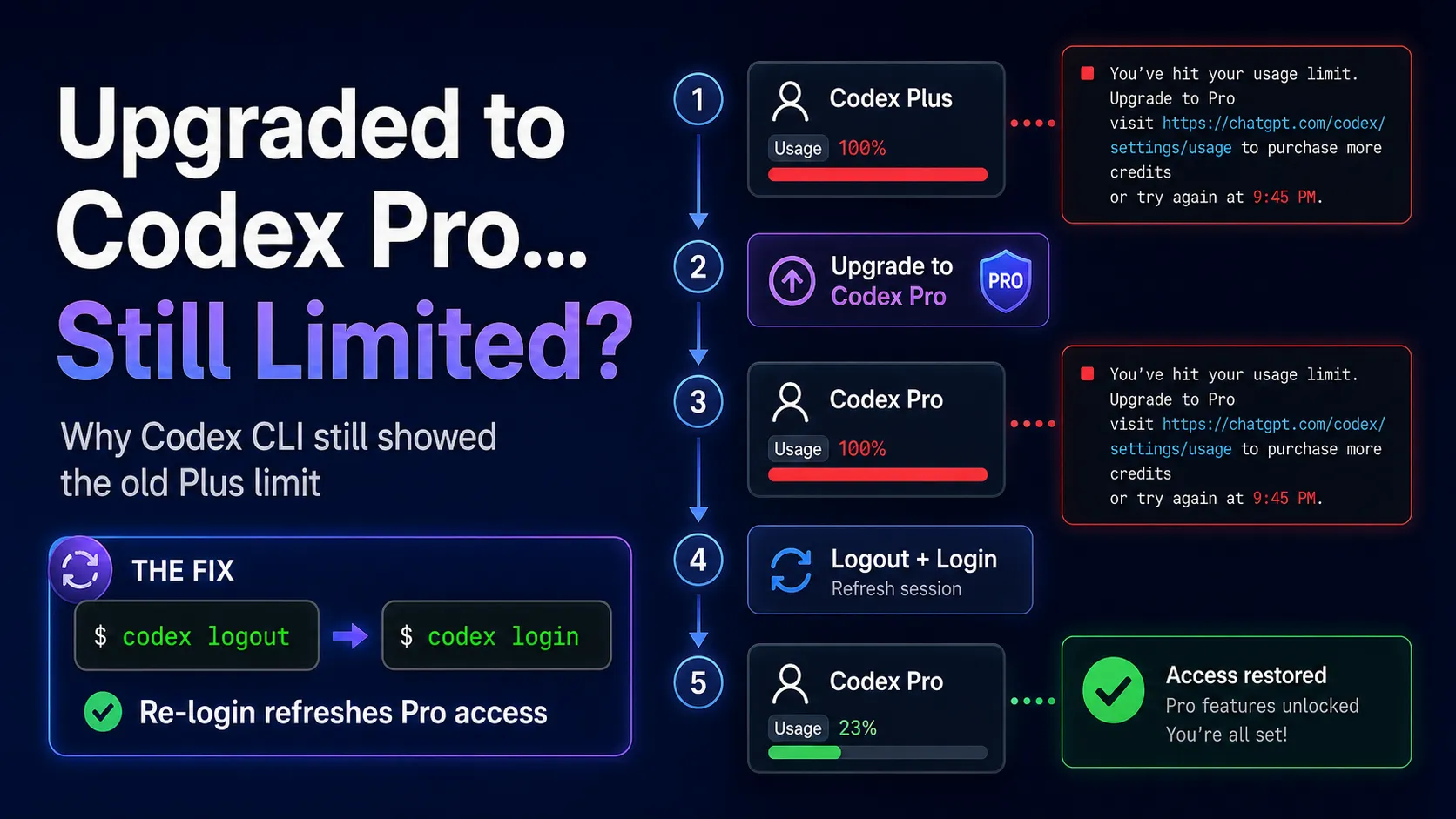
- Users may still see a usage-limit error after upgrading from Codex Plus to Codex Pro.
- This often happens because Codex CLI keeps the old Plus login session instead of immediately refreshing the upgraded Pro entitlement.
- The original error message should be preserved for troubleshooting:
text ■ You've hit your usage limit. Upgrade to Pro (https://chatgpt.com/explore/pro), visit https://chatgpt.com/codex/settings/usage to purchase more credits or try again at 9:45 PM.
- The practical fix is to log out of Codex CLI and log back in:
bash codex logout codex login
- After re-login, Codex CLI should re-check the account status and recognize the upgraded Pro plan.
What Happened: Upgraded From Codex Plus to Codex Pro, But Still Blocked
A common Codex CLI issue occurs when a user starts on Codex Plus, hits the usage limit, upgrades to Codex Pro, and then still sees the same restriction in the terminal.
The error usually looks like this:
text ■ You've hit your usage limit. Upgrade to Pro (https://chatgpt.com/explore/pro), visit https://chatgpt.com/codex/settings/usage to purchase more credits or try again at 9:45 PM.
At first glance, this looks like the Pro upgrade did not work. However, in many cases, the upgrade has already been completed successfully on the web account. The real issue is that Codex CLI is still using the previous Codex Plus session.
That means the browser account may already have Pro access, while the local CLI session continues to behave as if it is still on Plus.
Why This Happens
Codex CLI relies on a local authenticated session. When the account is upgraded from Plus to Pro, the plan change may update correctly in the web interface, but the CLI may not automatically refresh its session immediately.
This creates a temporary mismatch between:
- The ChatGPT web account, which has already been upgraded to Codex Pro.
- The Codex CLI session, which may still hold the old Plus authentication state.
- The usage-limit system, which checks the current CLI session instead of assuming the latest browser-side subscription status.
Analysis shows that this is usually an authentication synchronization issue, not necessarily a failed payment or failed upgrade.
The Correct Fix: Re-Login to Codex CLI
The most reliable fix is to force Codex CLI to refresh the account session.
Run:
bash codex logout codex login
This does two things:
codex logoutclears the old local Codex CLI session.codex logincreates a fresh session using the current ChatGPT account status.
After the browser login flow is completed, Codex CLI should reconnect to the upgraded Pro account instead of continuing to use the old Plus session.
Step-by-Step Fix
Step 1: Confirm the Upgrade Was Completed
Before changing the CLI session, confirm that the account was actually upgraded from Codex Plus to Codex Pro.
Open the Codex usage settings page:
text https://chatgpt.com/codex/settings/usage
Check whether the account shows the expected Pro status, current usage, reset time, or credit options.
Step 2: Log Out of Codex CLI
In the terminal, run:
bash codex logout
This removes the existing CLI login state. If the CLI was still holding the previous Plus session, this step clears it.
Step 3: Log Back In
Next, run:
bash codex login
Complete the browser authentication flow.
During this step, make sure the browser is logged into the same ChatGPT account that was upgraded to Codex Pro.
Step 4: Restart the Terminal or Editor
After re-login, restart the terminal session.
If Codex is being used inside an editor, such as VS Code or another coding environment, restart the editor as well. This helps ensure the new authentication state is loaded correctly.
Step 5: Try Codex Again
Run Codex again after re-login.
If the issue was caused by the old Plus session, the usage-limit warning should be resolved, and Codex CLI should recognize the Pro entitlement.
Why Re-Login Solves the Problem
The key point is that a subscription upgrade does not always force every local tool to refresh immediately.
Codex CLI may continue using cached authentication data until the session is renewed. Re-login forces the CLI to:
- Drop the old local token.
- Start a new browser-based authentication flow.
- Reconnect to the latest account state.
- Re-check plan access and usage permissions.
This is why codex logout and codex login can fix the issue after upgrading from Plus to Pro.
Plus Limit vs Pro Access: What Users Should Understand
The confusing part is that the message says “Upgrade to Pro” even after the user has already upgraded.
That does not always mean the upgrade failed. It may simply mean the CLI has not refreshed its account state.
However, it is also important to understand that Codex Pro does not necessarily mean unlimited usage. Pro can provide a higher allowance, but intensive agentic coding tasks may still consume usage quickly.
Examples of high-usage tasks include:
- Large repository analysis.
- Multi-file refactoring.
- Long debugging sessions.
- Repeated failed attempts.
- Broad prompts such as “fix the entire project.”
- Tasks involving many files, long context, or multiple tool calls.
So there are two different scenarios:
- Scenario A: The account upgraded to Pro, but CLI still thinks it is Plus. Re-login usually fixes this.
- Scenario B: The Pro quota itself has been reached. Re-login will not bypass the quota; the user must wait for reset or purchase credits.
How to Tell Whether It Is a Login Issue or a Real Usage Limit
Use this quick diagnostic flow:
- If the account was just upgraded from Plus to Pro and the same error still appears immediately, it is likely a CLI session refresh issue.
- If
codex logoutandcodex loginfix the problem, the cause was stale authentication. - If the same error continues after re-login, check the usage page.
- If the usage page shows exhausted quota, it is a real usage-limit issue.
- If the usage page shows available Pro usage but CLI still fails, verify that the CLI logged into the correct account.
Common Pitfalls
Logging Into the Wrong Account
Many users have multiple ChatGPT accounts. During codex login, the browser may automatically authenticate with the wrong account.
This is especially common when one browser profile is logged into a free or Plus account, while another account has Pro.
Before completing the login flow, confirm the account identity in the browser.
Assuming the Web Upgrade Instantly Updates the CLI
The ChatGPT web account and Codex CLI are related, but they are not always refreshed at exactly the same time.
The web interface may show Pro correctly while the CLI still uses the older Plus session.
Confusing Plan Upgrade With Credit Exhaustion
If the Pro plan is recognized but usage is still exhausted, the issue is no longer authentication. It is actual consumption.
In that case, users need to either wait until the reset time shown in the error message or purchase additional credits from the Codex usage settings page.
Using API Key Mode Instead of ChatGPT Login
If a setup uses an API key instead of ChatGPT account login, the behavior may differ. ChatGPT plan access and API billing are separate systems.
For Codex Pro access through the CLI, make sure the tool is authenticated through the correct ChatGPT account flow.
Recommended Troubleshooting Checklist
When Codex still shows the usage-limit message after upgrading from Plus to Pro, follow this checklist:
- Confirm the account has been upgraded to Codex Pro.
- Open:
text https://chatgpt.com/codex/settings/usage
- Check whether the usage page shows Pro access.
- Run:
bash codex logout codex login
- Make sure the browser login flow uses the Pro account.
- Restart the terminal or editor.
- Try Codex again.
- If the error remains, check whether the Pro quota has actually been consumed.
Practical Fix Summary
The short version of the fix is:
bash codex logout codex login
Use this when the workflow looks like this:
- The user was originally on Codex Plus.
- Codex Plus hit the usage limit.
- The user upgraded to Codex Pro.
- Codex CLI still showed:
text ■ You've hit your usage limit. Upgrade to Pro (https://chatgpt.com/explore/pro), visit https://chatgpt.com/codex/settings/usage to purchase more credits or try again at 9:45 PM.
- Re-login refreshed the CLI session and resolved the issue.
Conclusion
When Codex CLI still shows a usage-limit warning after upgrading from Codex Plus to Codex Pro, the first thing to check is not billing failure. The more likely issue is that Codex CLI is still using the old Plus session.
The recommended fix is simple:
bash codex logout codex login
This forces the CLI to refresh its authentication state and reconnect to the upgraded Pro account.
If the problem continues after re-login, the next step is to check the Codex usage settings page and determine whether the Pro quota itself has been reached.
For developers using Codex CLI heavily, the best practice is clear: after upgrading plans, switching accounts, or changing workspace context, always re-login to Codex CLI before deeper troubleshooting.
Continue Reading
More articles connected to the same themes, protocols, and tools.

Referenced Tools
Browse entries that are adjacent to the topics covered in this article.

Hyper3D MCP
MCP ServersHyper3D MCP is Hyper3D's hosted Rodin MCP server for creating 3D assets from natural-language instructions or supported references, checking asynchronous generation progress, and retrieving model download links inside AI coding clients. Official setup is documented for Codex, Claude Code, and Kimi Code CLI.

PaidSync.ai
MCP ServersPaidSync.ai is a hosted MCP server for paid advertising that exposes 610+ tools across 14 advertising, analytics, tagging, and commerce platforms. It supports read/write workflows from AI clients including ChatGPT, Claude, Gemini, Cursor, Claude Code, and Codex, with a free plan.