vercel eve
Vercel Eve is an open-source, filesystem-first TypeScript framework for building durable AI agents on Vercel. It organizes agent capabilities as files for instructions, tools, skills, channels, schedules, subagents, and connections, including integrations with external MCP and OpenAPI tools.
About
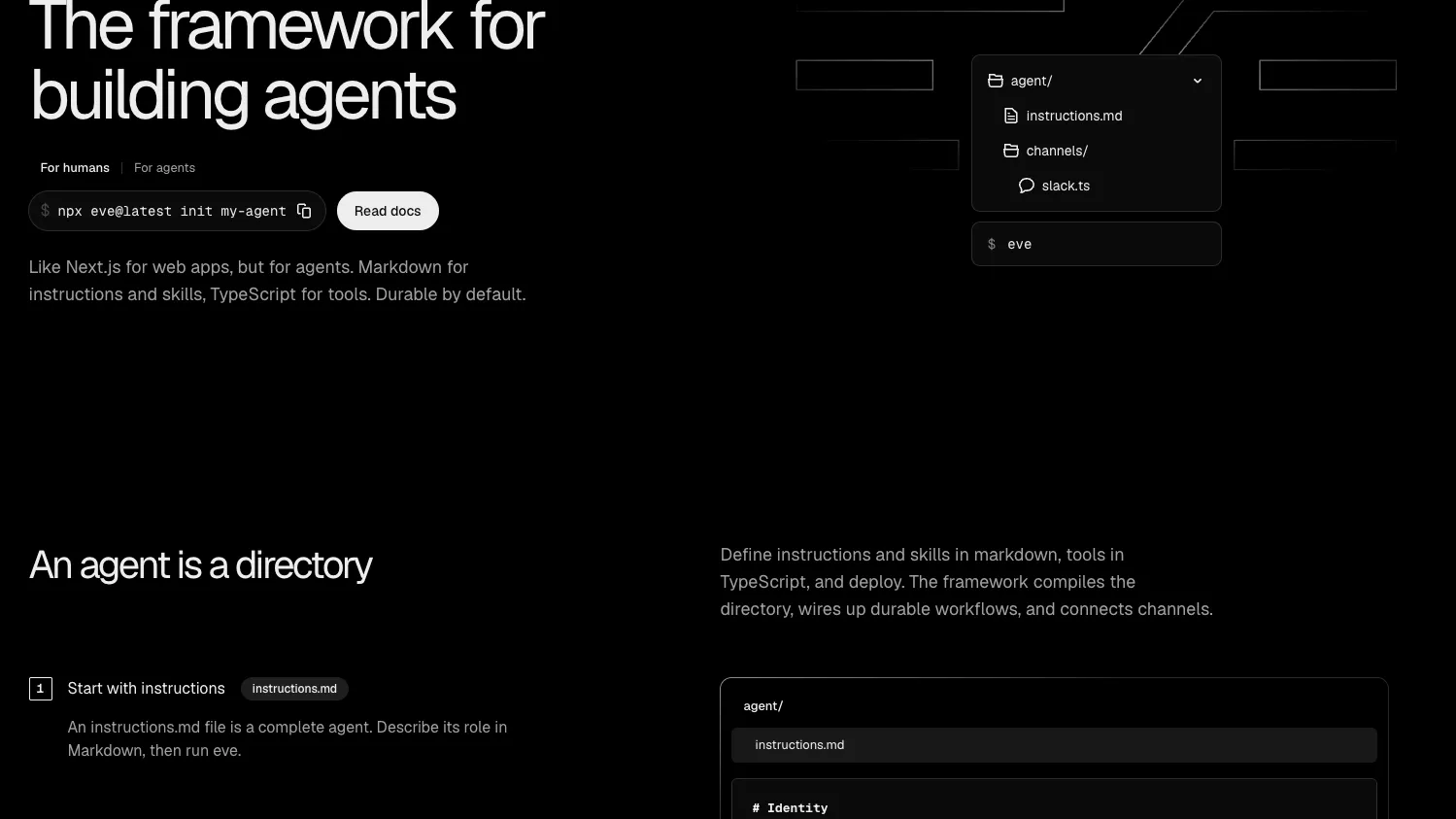
Vercel Eve is a filesystem-first framework for durable backend AI agents. The official Vercel page describes it as "like Next.js for web apps, but for agents": instructions and skills are written in Markdown, tools are written in TypeScript, and an agent is authored as a directory.
This entry is categorized as a framework, not an MCP server. Eve can connect agents to external MCP servers and OpenAPI-based tools, but the verified sources do not describe Eve itself as a standalone MCP server exposing MCP tools to Claude Desktop, Cursor, or similar MCP clients.
Key Features
- Filesystem-first agent layout under
agent/, withinstructions.md, optionalagent.ts,tools/,skills/,channels/,connections/,subagents/, andschedules/. - TypeScript tools: a file under
agent/tools/can define a typed action the model may call, with the filename becoming the tool name. - Markdown skills: procedures can be stored as Markdown and loaded when relevant instead of being carried in every prompt.
- Channels for running the same agent in surfaces such as Slack, Discord, Microsoft Teams, Telegram, Twilio, GitHub, Linear, and web chat where documented by the integrations page.
- Connections for external services, including documented MCP or OpenAPI connections such as Linear, Notion, Datadog, and Honeycomb.
- Vercel-oriented production features described by Vercel include durable execution, sandboxed compute, human-in-the-loop approvals, subagents, and evals.
Use Cases
- Build Slack or web-chat agents backed by a Vercel project.
- Add typed tools and reusable skills to internal assistants.
- Connect agents to third-party systems through Vercel Connect, MCP connections, or OpenAPI connections.
- Run scheduled agents for recurring jobs such as reports or triage workflows.
- Organize a larger agent fleet with consistent project structure, Git diffs, and shared deployment conventions.
Setup or Requirements
For a new project, the official README documents npx eve@latest init my-agent. For an existing project, Vercel's announcement describes npm install eve@latest and adding the required agent/agent.ts and agent/instructions.md files.
The README also documents npm run dev for a generated scaffold. Vercel's announcement and guides show eve dev for the local terminal UI and eve deploy for deploying an Eve app. The Slack starter guide documents a Vercel account and a Slack workspace for that template, plus Node.js 24 or newer, pnpm, and the Vercel CLI for local development.
Compatibility
Eve is a TypeScript framework published as the npm package eve and developed in the open at vercel/eve. It is designed for Vercel deployment and integrates with Vercel AI Gateway, Vercel Sandbox, Vercel Workflows, and Vercel Connect where those capabilities are used.
Eve is related to MCP because an Eve agent can use MCP connections as tools. It should not be listed as an MCP server unless a separate, documented Eve MCP server endpoint or client setup is published.
Limitations
- Public sources reviewed on 2026-06-18 describe Eve as a framework, not as an MCP server.
- Exact MCP client configuration for Claude Desktop, Claude Code, Cursor, Codex, Windsurf, VS Code, or Lovable is not documented for Eve itself.
- Eve is in beta/public preview, and Vercel notes that the framework, APIs, documentation, and behavior may change before general availability.
Sources
- Official website: https://vercel.com/eve
- Official docs: https://eve.dev/docs
- Vercel docs: https://vercel.com/docs/eve
- GitHub: https://github.com/vercel/eve
- Changelog: https://vercel.com/changelog/introducing-eve-an-open-source-agent-framework
- Announcement: https://vercel.com/blog/introducing-eve
- Integrations: https://eve.dev/integrations
- Slack starter guide: https://vercel.com/kb/guide/eve-slack-agent-starter
MCP Setup
Companion app or plugin
Not applicable: Vercel Eve is documented as an agent framework, not a standalone MCP server.
Setup docs: https://eve.dev/docs
Tags
Alternatives
Comparable tools and resources explicitly connected to vercel eve.
Related Entries
Keep exploring similar tools and resources in this category.


PaidSync.ai
MCP ServersPaidSync.ai is a hosted MCP server for paid advertising that exposes 610+ tools across 14 advertising, analytics, tagging, and commerce platforms. It supports read/write workflows from AI clients including ChatGPT, Claude, Gemini, Cursor, Claude Code, and Codex, with a free plan.

Hyper3D MCP
MCP ServersHyper3D MCP is Hyper3D's hosted Rodin MCP server for creating 3D assets from natural-language instructions or supported references, checking asynchronous generation progress, and retrieving model download links inside AI coding clients. Official setup is documented for Codex, Claude Code, and Kimi Code CLI.



Related Reads
Background, tutorials, and protocol context connected to this entry.