

Higgsfield MCP
Higgsfield MCP is Higgsfield AI's hosted MCP connector for generating images, videos, reusable characters, and creative assets from Claude or MCP-compatible agents. It uses a Higgsfield account and platform credits, with no API key documented for the official MCP connector.
About
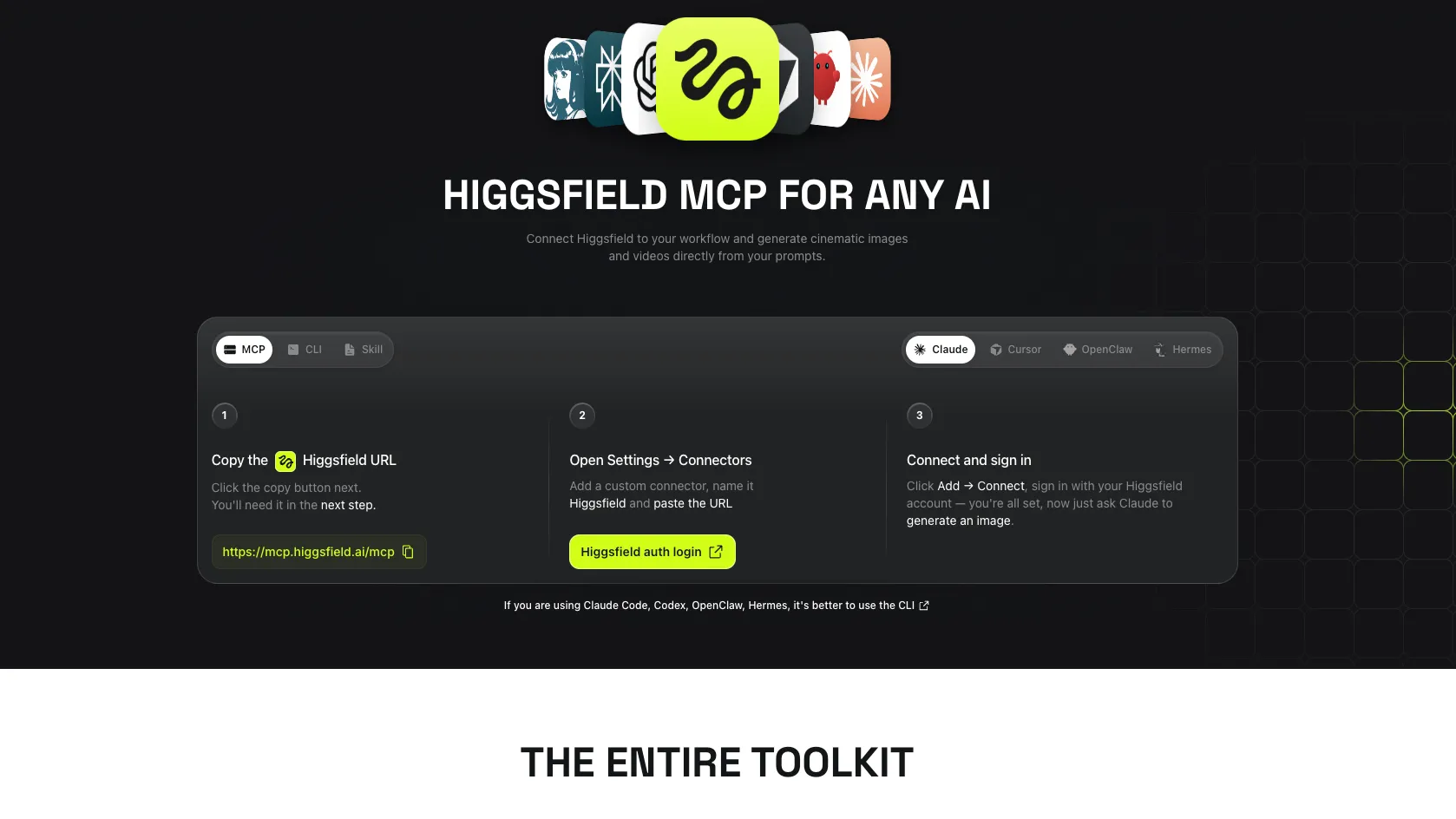
Higgsfield MCP is the official hosted MCP connector for Higgsfield AI. It lets supported agents connect to Higgsfield's media generation stack so a chat-based workflow can create images, videos, reusable Soul characters, and references from previous generations without switching into a separate editor.
The public Higgsfield pages describe it as a connector for Claude and MCP-compatible agents rather than a local open-source server package. The official setup path is account-based sign-in through Higgsfield; no API key is documented for the MCP connector.
Key Features
- Hosted Higgsfield MCP endpoint for Claude and compatible agents.
- Image and video generation through Higgsfield's model catalog, including examples such as Soul, Cinema Studio, Flux, Seedream, Kling, Minimax Hailuo, and Veo.
- Character-consistency workflows through Soul character training.
- Iterative creation from text prompts, reference images, previous generations, and mixed creative briefs.
- Creative automation examples documented by Higgsfield include video analysis, product-page-to-launch-video workflows, image-to-video animation, short-clip formatting, and virality scoring.
Use Cases
Higgsfield MCP is most relevant for builders and content teams that want a general AI agent to trigger media generation from inside a conversation. Common fit areas include product launch videos, ecommerce visuals, short-form social clips, ad variants, blog or landing-page hero assets, character-consistent campaigns, and creative model comparisons across several image or video models.
Setup or Requirements
For client-specific setup details, use the mcpSetup field. Publicly documented requirements include a Higgsfield account, a client that supports Claude custom connectors or MCP-compatible connections, and Higgsfield credits for generation. Higgsfield says new accounts receive free credits, while paid plans unlock higher volume, longer durations, and broader model access.
Compatibility
Higgsfield's official MCP page says the connector works with Claude web, Cowork, Claude Code, OpenClaw, Hermes Agent, NemoClaw, and any MCP-compatible client. The same page UI also lists Claude, Cursor, OpenClaw, and Hermes. For Claude Code, Codex, OpenClaw, and Hermes-style terminal agents, Higgsfield's own MCP/CLI page recommends using the CLI path instead of the visual Claude connector flow.
Limitations
- Official pages describe capabilities but do not publish the exact low-level MCP tool names for the hosted MCP server.
- The public official pages expose hosted server URLs but do not consistently name the transport as stdio, HTTP, SSE, or WebSocket.
- Official pages show both
https://mcp.higgsfield.aiandhttps://mcp.higgsfield.ai/mcpin different setup contexts; use the URL shown by the current Higgsfield MCP copy button or the client-specific official guide. - Exact public setup for Windsurf, VS Code, Lovable, and a raw Cursor MCP config was not found in official Higgsfield sources. Cursor and Codex are documented through the Higgsfield Skills/CLI path.
- Usage runs against Higgsfield credits. Higher volume, longer durations, and some model access may require paid plans.
Sources
- Official MCP page: https://higgsfield.ai/mcp
- Claude video connector setup: https://higgsfield.ai/claude-ai-video-generator
- Claude image connector setup: https://higgsfield.ai/claude-ai-image-generator
- Blog setup guide: https://higgsfield.ai/blog/Generate-AI-Videos-From-Claude-with-Higgsfield-MCP
- Official CLI repository: https://github.com/higgsfield-ai/cli
- Official Skills repository: https://github.com/higgsfield-ai/skills
MCP Setup
Prerequisites
- Higgsfield account
- Claude account with custom connector support or another MCP-compatible client
- Higgsfield credits for generation
- Node.js required only for the optional Skills/CLI path that uses npx
Access requirements
- No API key is documented for the official hosted MCP connector
- Sign in with a Higgsfield account through the browser-based connector flow
- Generations use the same Higgsfield credit system as the main platform
- New Higgsfield accounts are documented as receiving free credits
- Paid plans may be required for higher volume, longer durations, and broader model access
- Managed Claude workspaces may need an admin to allowlist the Higgsfield MCP URL
Companion app or plugin
Name: Higgsfield CLI and Higgsfield Skills Install URL: https://github.com/higgsfield-ai/skills
- Use the companion CLI/Skills path when working in terminal agents such as Claude Code, Codex, Cursor, OpenClaw, or Hermes-style workflows.
- Install the CLI with one of the official methods, such as npm install -g @higgsfield/cli, curl -fsSL https://raw.githubusercontent.com/higgsfield-ai/cli/main/install.sh | sh, or brew install higgsfield-ai/tap/higgsfield.
- Authenticate the CLI by running higgsfield auth login.
- Install Higgsfield Skills with npx skills add higgsfield-ai/skills, gh skill install higgsfield-ai/skills, or the Claude Code marketplace commands documented in the Skills repository.
Optional companion path. It is documented by Higgsfield for agent/CLI workflows and is separate from adding the hosted MCP URL in Claude Settings → Connectors.
Client setup
Claude Desktop
- Open the Claude desktop app or claude.ai.
- Go to Settings → Connectors.
- Add a custom connector named Higgsfield.
- Paste the Higgsfield connector URL documented for Claude: https://mcp.higgsfield.ai.
- Save the connector, then click Connect.
Auth:
- Sign in with the Higgsfield account when Claude redirects to Higgsfield.
- Approve access so the connector stays connected.
- Optionally adjust connector permissions in Claude if your workspace policy allows it.
Official Claude-specific pages show https://mcp.higgsfield.ai. The general MCP page and some official guides also show https://mcp.higgsfield.ai/mcp, so verify the current URL on the Higgsfield MCP page if the client rejects one form. Exact transport name is not stated in the official pages.
Claude Code
npm install -g @higgsfield/cli
- Higgsfield's MCP/CLI page says CLI is the preferred path for Claude Code.
- Install the official CLI with npm install -g @higgsfield/cli, or use the documented curl or Homebrew installer from the GitHub README.
- Run higgsfield auth login.
- Optionally install Higgsfield Skills for Claude Code with npx skills add higgsfield-ai/skills.
- Claude Code marketplace alternative: run /plugin marketplace add higgsfield-ai/skills and then /plugin install higgsfield@higgsfield inside Claude Code.
Auth:
- Run higgsfield auth login and complete the browser sign-in.
- Ask Claude Code to generate a minimal test image with Higgsfield to verify the skill or CLI invocation.
Exact official claude mcp add command was not found on Higgsfield's official pages. Use the documented CLI/Skills path unless Higgsfield's current UI provides a dedicated Claude Code command.
Cursor
npx skills add higgsfield-ai/skills
- Use the official Higgsfield Skills repository for Cursor-compatible agent skills.
- Run npx skills add higgsfield-ai/skills.
- The skills installer auto-detects supported host paths when possible.
- Use the Higgsfield CLI auth flow if prompted or if the skill cannot invoke the CLI.
Auth:
- Authenticate with higgsfield auth login if the installer or first invocation requires CLI auth.
Cursor is listed on the Higgsfield MCP page UI and the official Skills README documents Cursor support. An exact official Cursor remote-MCP config block was not found.
Codex
npx skills add higgsfield-ai/skills
- Use the official Higgsfield Skills repository for Codex-compatible skill workflows.
- Run npx skills add higgsfield-ai/skills.
- Alternatively use gh skill install higgsfield-ai/skills when GitHub CLI v2.90+ is available.
- Authenticate the Higgsfield CLI if the skill setup or first generation request requires it.
Auth:
- Run higgsfield auth login and complete browser sign-in when required.
The Skills repository documents Codex support. Exact official Codex MCP server config was not found.
Windsurf
Exact public Windsurf setup is not documented in the official Higgsfield MCP, CLI, or Skills pages checked on 2026-07-03.
VS Code
Exact public VS Code setup is not documented in the official Higgsfield MCP, CLI, or Skills pages checked on 2026-07-03.
Lovable
Exact public Lovable setup is not documented in the official Higgsfield MCP, CLI, or Skills pages checked on 2026-07-03.
Other
- Use an MCP-compatible client that can add a hosted remote MCP server.
- Add the Higgsfield MCP server URL from the official page: https://mcp.higgsfield.ai/mcp.
- Authenticate through the Higgsfield account if the client opens a browser sign-in flow.
Auth:
- Sign in with the Higgsfield account through the client flow when prompted.
Official Higgsfield FAQ says any MCP-compatible client can connect. Exact transport label and per-client config syntax are not published in the official MCP page.
Authorization flow
- Add the Higgsfield hosted MCP connector URL or use the documented CLI/Skills path.
- Start the connection or run the first Higgsfield generation request.
- Sign in with a Higgsfield account in the browser-based flow.
- Approved generations are billed against Higgsfield credits according to model and resolution.
Setup docs: https://higgsfield.ai/mcp
Tags
Alternatives
Comparable tools and resources explicitly connected to Higgsfield MCP.
Related Entries
Keep exploring similar tools and resources in this category.

Hyper3D MCP
MCP ServersHyper3D MCP is Hyper3D's hosted Rodin MCP server for creating 3D assets from natural-language instructions or supported references, checking asynchronous generation progress, and retrieving model download links inside AI coding clients. Official setup is documented for Codex, Claude Code, and Kimi Code CLI.





Related Reads
Background, tutorials, and protocol context connected to this entry.


