Codex MCP Server
An MCP server wrapper that bridges Claude (and other MCP clients) with OpenAI's Codex CLI, letting you harness GPT-powered code generation, analysis, refactoring, and execution directly from your preferred AI coding environment.
Overview
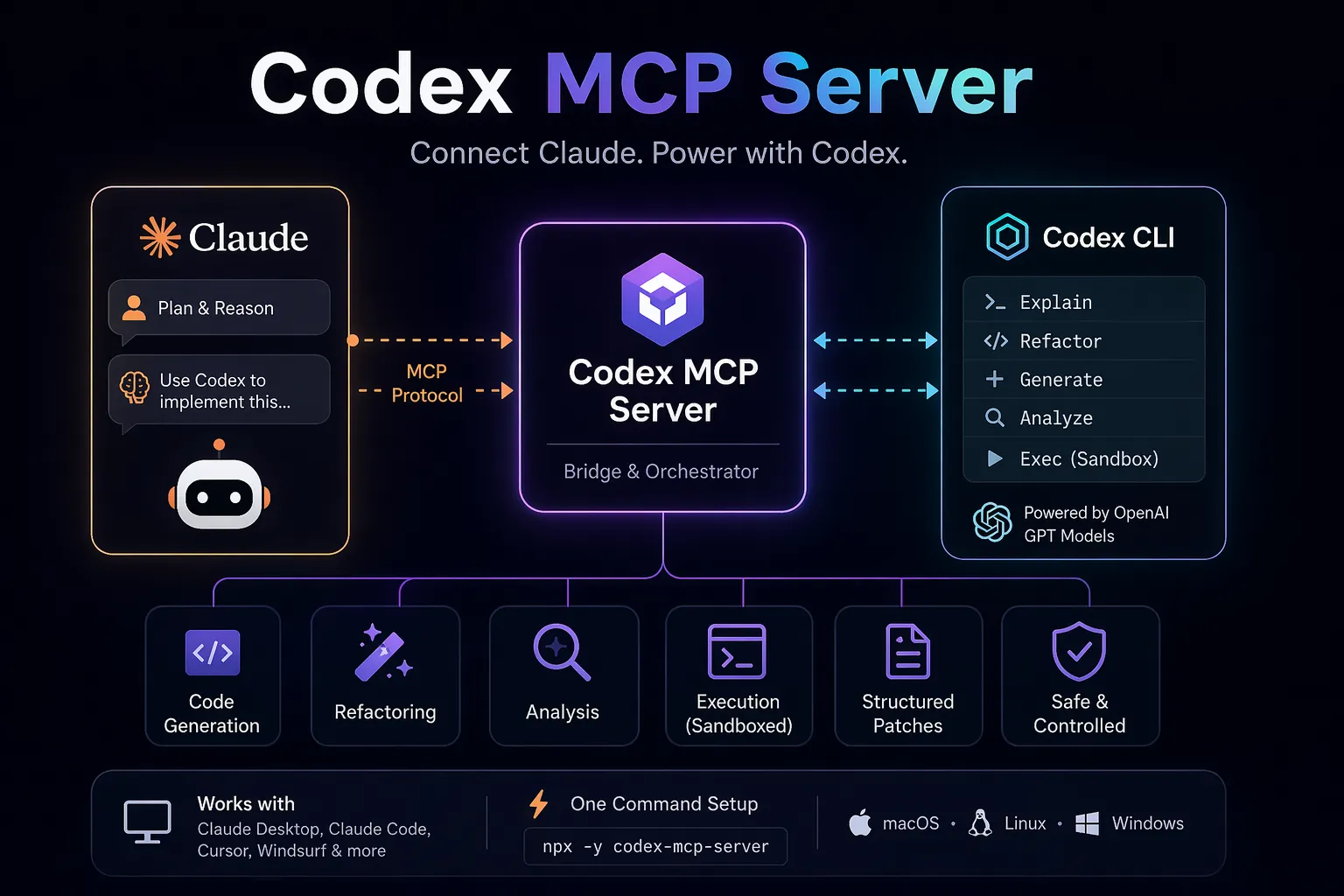
Codex MCP Server is a lightweight, open-source Model Context Protocol (MCP) server that wraps OpenAI's official Codex CLI. It acts as a bridge, allowing MCP clients such as Claude Desktop/Code, Cursor, Windsurf, and others to call Codex as a tool for advanced coding tasks.
This enables hybrid AI workflows where Claude handles high-level reasoning and strategy while delegating heavy code generation, refactoring, analysis, and execution to Codex's powerful GPT-based engine.
Popular community project maintained by tuannvm and others.
Key Features
- Full integration with OpenAI Codex CLI capabilities
- Exposes Codex commands (explain, refactor, generate, analyze, exec, etc.) as structured MCP tools
- Supports
codex execfor safe, sandboxed code execution and edits - Streams progress updates and structured patch outputs
- Easy one-command installation via
npx - Works with both local STDIO and configurable environments
- Cross-platform (macOS, Linux, Windows)
- Secure approval flows for file modifications
Installation & Setup
Quick Start (for Claude Code)
claude mcp add codex-cli -- npx -y codex-mcp-server
Alternative repositories / forks
- https://github.com/tuannvm/codex-mcp-server (primary)
- https://github.com/cexll/codex-mcp-server (enhanced version)
- Built-in Codex MCP mode:
codex mcp-server(native support in recent Codex CLI)
After adding, restart your MCP client and confirm the server appears in the tools list.
Use Cases
- Hybrid Agentic Coding: Use Claude for planning and Codex for high-quality code output
- Code Review & Refactoring: Ask Claude to review a codebase, then delegate complex refactors to Codex
- Debugging Stuck Tasks: When one model gets stuck, hand off to the other via MCP
- Large-scale Analysis: Leverage Codex's context window and reasoning on massive projects
- Multi-model Orchestration: Combine strengths of Anthropic and OpenAI models in a single workflow
- CI/CD Automation and batch code transformations
Requirements
- OpenAI Codex CLI installed (
npm i -g @openai/codexor Homebrew) - Valid OpenAI API access (Codex uses GPT models)
- An MCP-compatible client (Claude Code/Desktop recommended)
Resources
- GitHub: https://github.com/tuannvm/codex-mcp-server
- Official Codex MCP Documentation: https://developers.openai.com/codex/mcp/
- Native Codex as MCP Server: Run
codex mcp-serverdirectly
Codex MCP Server is one of the most practical tools for developers wanting to combine the best of Claude's reasoning with Codex's coding prowess in the growing MCP ecosystem.
Tags
Related Entries
Keep exploring similar tools and resources in this category.

Hyper3D MCP
MCP ServersHyper3D MCP is Hyper3D's hosted Rodin MCP server for creating 3D assets from natural-language instructions or supported references, checking asynchronous generation progress, and retrieving model download links inside AI coding clients. Official setup is documented for Codex, Claude Code, and Kimi Code CLI.





Related Reads
Background, tutorials, and protocol context connected to this entry.