code base memory mcp
Codebase Memory is an open-source MCP server that indexes local codebases into a persistent knowledge graph for AI coding agents. It exposes structural code search, call-path tracing, impact analysis, architecture summaries, Cypher-style graph queries, ADR management, and related code-intelligence tools over stdio.
About
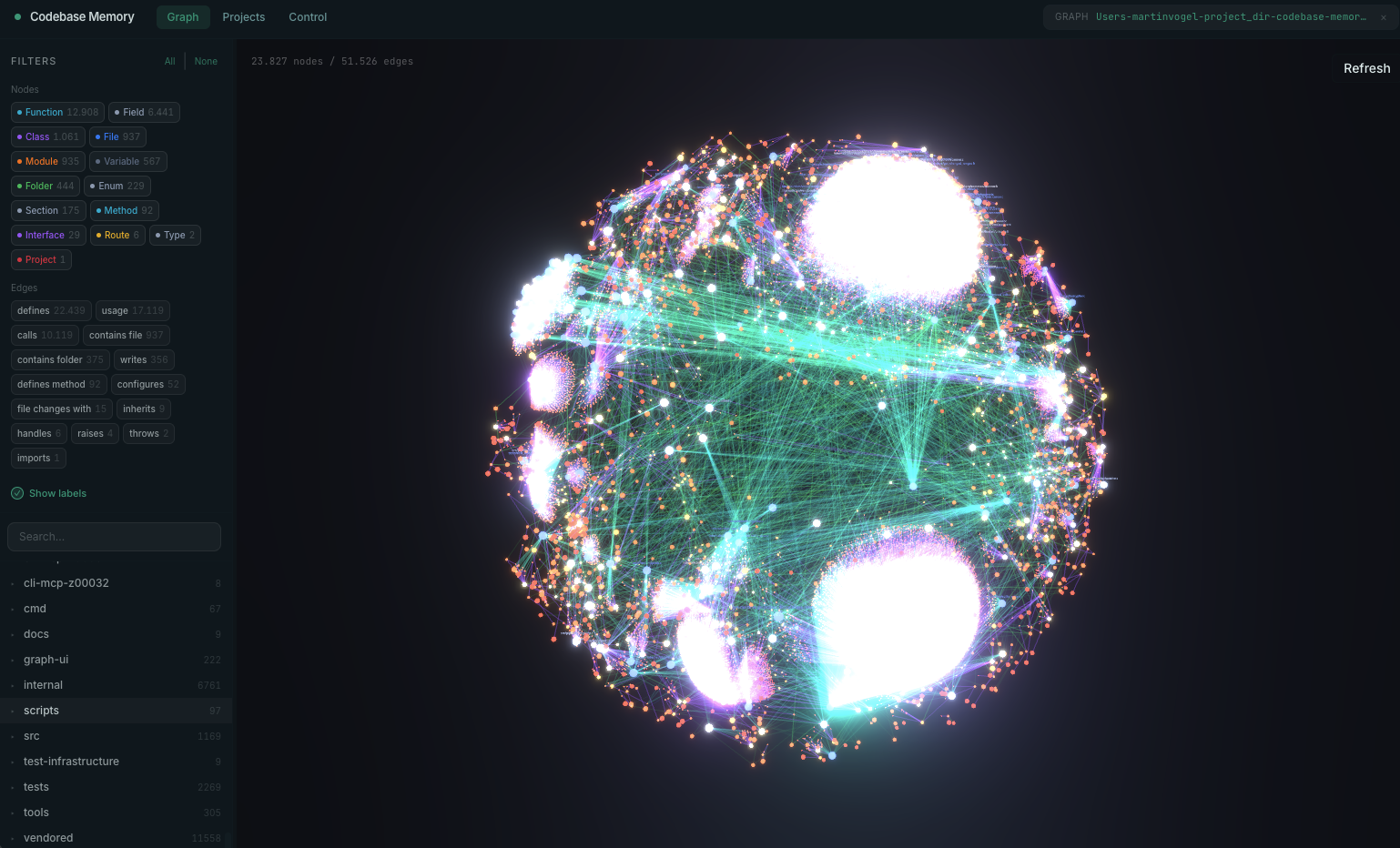
codebase-memory-mcp is a local, open-source Model Context Protocol server from DeusData for codebase understanding. It parses a repository into a persistent SQLite-backed knowledge graph of projects, packages, folders, files, classes, functions, methods, routes, resources, imports, calls, HTTP calls, async calls, data flow, and related edges.
The server is not an LLM wrapper. The MCP client remains the reasoning layer, while codebase-memory-mcp provides structured graph and code-intelligence queries so an agent can answer questions such as what calls a function, which files changed, which routes exist, or what architectural components are present.
Key Features
- Persistent local knowledge graph for functions, classes, call chains, HTTP routes, infrastructure-as-code resources, and cross-repository relationships.
- 14 documented MCP tools, including
index_repository,list_projects,delete_project,index_status,search_graph,trace_path,detect_changes,query_graph,get_graph_schema,get_code_snippet,get_architecture,search_code,manage_adr, andingest_traces. - Tree-sitter parsing across a large language set, with Hybrid LSP semantic type resolution documented for Python, TypeScript/JavaScript/JSX/TSX, PHP, C#, Go, C, C++, Java, Kotlin, and Rust.
- Semantic code search and similarity edges using bundled local embeddings, plus BM25 full-text search and graph-augmented code search.
- Optional graph visualization UI variant served locally at
localhost:9749. - Local-first operation with no documented API key requirement and no embedded LLM.
Use Cases
- Help coding agents inspect a large repository without repeatedly grepping and reading files.
- Trace inbound or outbound call paths before editing a function.
- Ask for an architecture overview of packages, routes, hotspots, layers, clusters, and ADRs.
- Detect change impact from an uncommitted git diff.
- Run read-only Cypher-style graph queries for custom structural analysis.
- Persist architecture decisions and project graph artifacts across sessions or teams.
Setup or Requirements
Public setup is documented for local installation and stdio MCP usage. The project publishes prebuilt binaries, installer scripts, source build instructions, npm/PyPI package metadata through server.json, and auto-configuration for several coding agents. Exact setup commands and client-specific notes are captured in mcpSetup.
Compatibility
The README documents auto-detection and configuration for Claude Code, Codex CLI, Gemini CLI, Zed, OpenCode, Antigravity, Aider, KiloCode, VS Code, OpenClaw, and Kiro. The MCP server.json documents npm and PyPI packages with stdio transport. Cursor, Windsurf, Claude Desktop, and Lovable are not listed in the current README's auto-detected agent table, so their exact public setup is not treated as documented here.
Limitations
The server reads local source files, writes agent configuration files, and may install hooks or instructions for supported agents; this is part of the documented design and should be reviewed before running installer scripts on sensitive systems. Documentation viewed on 2026-07-03 is not fully consistent on the language count: the README and project site describe 158 languages, while the current server.json description says 159 languages. This entry therefore avoids relying on a single exact count for search cards.
Sources
- GitHub repository: https://github.com/DeusData/codebase-memory-mcp
- Project website: https://deusdata.github.io/codebase-memory-mcp/
- Raw README: https://raw.githubusercontent.com/DeusData/codebase-memory-mcp/main/README.md
- MCP server.json: https://raw.githubusercontent.com/DeusData/codebase-memory-mcp/main/server.json
- GitHub releases: https://github.com/DeusData/codebase-memory-mcp/releases/latest
- arXiv preprint: https://arxiv.org/abs/2603.27277
- PulseMCP listing: https://www.pulsemcp.com/servers/deusdata-codebase-memory
MCP Setup
Prerequisites
- macOS, Linux, or Windows for prebuilt binaries
- No Docker or runtime dependency is documented as required for standard prebuilt binaries
- C compiler, C++ compiler, zlib, and Git are required when building from source
- Optional UI variant is required for the local 3D graph visualization
- A local repository path is required before indexing
Access requirements
- No API key is documented as required
- No OAuth or subscription requirement is documented
- All indexing and querying are documented as local
- Installer writes MCP entries, instruction files, skills, or hooks for supported agents
Client setup
Claude Code
Transport: stdio
- Use the documented Claude Code prompt: Install this MCP server: https://github.com/DeusData/codebase-memory-mcp
- Alternatively run the documented installer and restart Claude Code.
- Ask the agent to index the project after restart.
Auth:
- No API key or OAuth step is documented.
- Verify with /mcp after restart.
The README documents Claude Code auto-configuration through .claude/.mcp.json, 4 skills, and a non-blocking PreToolUse hook for Grep/Glob graph augmentation.
Claude Desktop
Exact Claude Desktop setup is not documented in the current README. The project documents generic stdio MCP configuration and Claude Code-specific setup.
Cursor
Exact Cursor setup is not documented in the current README auto-detected agent table.
Codex
Transport: stdio
- Run the documented installer on a machine with Codex CLI installed.
- Restart Codex CLI after installation.
Auth:
- No API key or OAuth step is documented for codebase-memory-mcp.
The README documents Codex CLI auto-configuration through .codex/config.toml, .codex/AGENTS.md, and a SessionStart reminder, but does not publish a manual TOML block.
Windsurf
Exact Windsurf setup is not documented in the current README auto-detected agent table.
VS Code
Transport: stdio
- Run the documented installer on a machine with VS Code installed.
- Restart the MCP-capable VS Code client or extension after installation.
Auth:
- No API key or OAuth step is documented for codebase-memory-mcp.
The README documents VS Code auto-configuration through Code/User/mcp.json, but does not publish the exact generated JSON.
Lovable
Exact Lovable setup is not documented.
Other
Transport: stdio
curl -fsSL https://raw.githubusercontent.com/DeusData/codebase-memory-mcp/main/install.sh | bash
- Run the one-line macOS/Linux installer.
- Restart the coding agent.
- Ask the agent to index the project.
Auth:
- No API key or OAuth step is documented.
Documented one-line installer for macOS/Linux. Add --ui by running curl -fsSL https://raw.githubusercontent.com/DeusData/codebase-memory-mcp/main/install.sh | bash -s -- --ui when the graph visualization UI is desired.
Other
Transport: stdio
Invoke-WebRequest -Uri https://raw.githubusercontent.com/DeusData/codebase-memory-mcp/main/install.ps1 -OutFile install.ps1
- Download the Windows PowerShell installer.
- Optionally inspect install.ps1.
- Run .\install.ps1.
- Restart the coding agent.
Auth:
- No API key or OAuth step is documented.
The README also documents irm https://raw.githubusercontent.com/DeusData/codebase-memory-mcp/main/scripts/setup-windows.ps1 | iex under setup scripts.
Other
Transport: stdio
{
  "mcpServers": {
    "codebase-memory-mcp": {
      "command": "/path/to/codebase-memory-mcp",
      "args": []
    }
  }
}
- Download or build the binary.
- Add the documented manual mcpServers block to
~/.claude/.mcp.jsonor a project.mcp.json. - Restart the agent.
- Verify with /mcp.
Auth:
- No API key or OAuth step is documented.
Generic manual stdio MCP configuration documented by the README.
Other
Transport: stdio
git clone https://github.com/DeusData/codebase-memory-mcp.git
- git clone https://github.com/DeusData/codebase-memory-mcp.git
- cd codebase-memory-mcp
- scripts/build.sh for the standard binary, or scripts/build.sh --with-ui for the UI binary.
- Use the resulting binary at build/c/codebase-memory-mcp.
Source build path documented in the README.
Other
Transport: stdio
yay -S codebase-memory-mcp-bin
- Install the Arch Linux AUR package with yay or paru.
The README documents both yay -S codebase-memory-mcp-bin and paru -S codebase-memory-mcp-bin.
Other
Transport: stdio
The MCP server.json documents npm package identifier codebase-memory-mcp with runtimeHint npx, and PyPI package identifier codebase-memory-mcp with runtimeHint uvx, both using stdio transport. The current README says it is available on npm and PyPI but does not expand exact npx or uvx client commands.
Authorization flow
- No OAuth, browser sign-in, hosted account, or subscription flow is documented.
- After installation, restart the coding agent and verify the server with /mcp where the client supports that command.
- Indexing begins when the agent is asked to index the project, or when auto_index is enabled.
Environment variables
CBM_CACHE_DIRCBM_DIAGNOSTICSCBM_DOWNLOAD_URLCBM_LOG_LEVELCBM_WORKERSCBM_DUMP_VERIFY_MIN_RATIO
Setup docs: https://github.com/DeusData/codebase-memory-mcp
Tags
Alternatives
Comparable tools and resources explicitly connected to code base memory mcp.
Related Entries
Keep exploring similar tools and resources in this category.

Hyper3D MCP
MCP ServersHyper3D MCP is Hyper3D's hosted Rodin MCP server for creating 3D assets from natural-language instructions or supported references, checking asynchronous generation progress, and retrieving model download links inside AI coding clients. Official setup is documented for Codex, Claude Code, and Kimi Code CLI.





Related Reads
Background, tutorials, and protocol context connected to this entry.