Agent Reach
Agent Reach is an open-source CLI and Agent Skill that installs, routes, and health-checks upstream tools for web, social, GitHub, video transcript, RSS, and search access. It is not documented as a standalone MCP server; some channels use MCP-backed upstream tools such as mcporter/Exa, xiaohongshu-mcp, and linkedin-scraper-mcp.
About
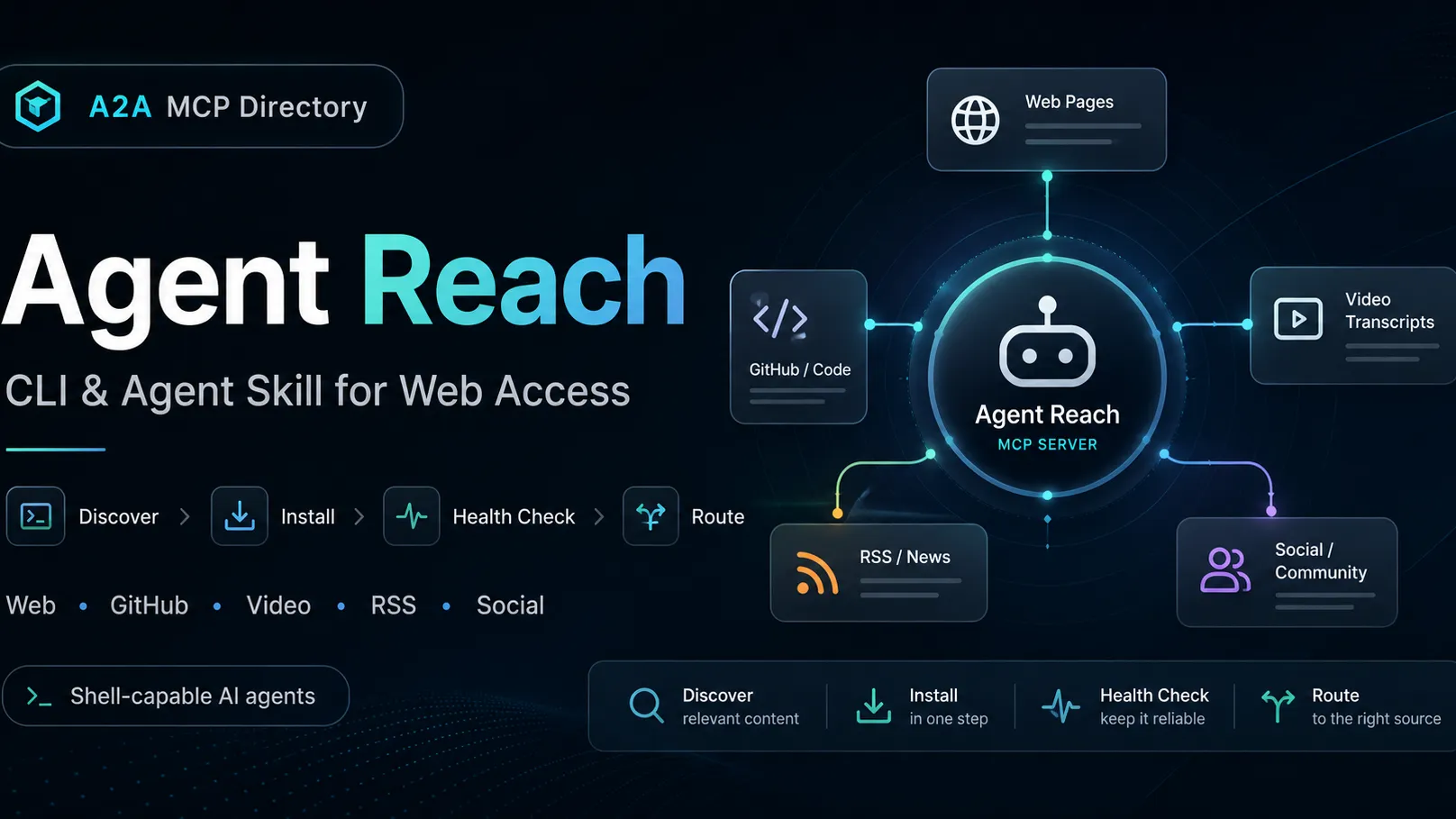
Agent Reach is a local CLI plus Agent Skill for giving shell-capable AI agents practical internet research access. The project describes itself as a selector, installer, health checker, and router: it installs and checks upstream tools, then the agent calls those upstream tools directly rather than going through a wrapper service.
Agent Reach should be categorized as a tools and skill-layer utility rather than a standalone MCP server. Its documentation does reference MCP-backed routes, including Exa search through mcporter, xiaohongshu-mcp for server-side XiaoHongShu access, and linkedin-scraper-mcp for fuller LinkedIn support.
Key Features
- Installs and health-checks access paths for web pages, YouTube, RSS, GitHub, Exa search, V2EX, Bilibili, Twitter/X, Reddit, XiaoHongShu, LinkedIn, Xueqiu, and Xiaoyuzhou podcast transcription where configured.
- Uses ordered backend lists per channel, with
agent-reach doctorreporting which backend is active and what needs fixing. - Registers a SKILL.md guide so compatible agents know when to call upstream commands such as Jina Reader via curl, gh CLI, yt-dlp, bili-cli, OpenCLI, twitter-cli, rdt-cli, feedparser, or mcporter.
- Provides safe and dry-run install modes for users who do not want automatic system changes.
Use Cases
- Give Claude Code, Cursor, Windsurf, Codex, OpenClaw, or another shell-capable agent a repeatable research setup.
- Read or summarize web pages, GitHub repositories, YouTube subtitles, Bilibili videos, RSS feeds, tweets, Reddit posts, XiaoHongShu notes, and other supported sources.
- Standardize a developer workstation or agent VM so the agent can diagnose which content channels work before a research task.
Compatibility
The official README documents Claude Code, Cursor, Windsurf, OpenClaw, Codex, and any agent that can execute shell commands. OpenClaw users must enable an exec-capable coding tool profile before installation. Claude Desktop setup is not documented in the official project sources reviewed.
Limitations
Agent Reach is not documented as a hosted service or a standalone MCP server with a public transport endpoint. Some channels require user-controlled credentials, browser cookies, browser sessions, QR login, or a separate API key. Cookie-based access can carry account-risk and credential-risk tradeoffs, so the project recommends using secondary accounts for platforms that require cookies. Browser actions such as form submission, multi-account isolation, and risk-control prompts are outside the core read/search scope.
Sources
- GitHub repository: https://github.com/Panniantong/Agent-Reach
- English README: https://github.com/Panniantong/Agent-Reach/blob/main/docs/README_en.md
- Install guide: https://github.com/Panniantong/agent-reach/blob/main/docs/install.md
- Raw install guide: https://raw.githubusercontent.com/Panniantong/agent-reach/main/docs/install.md
- Update guide: https://github.com/Panniantong/agent-reach/blob/main/docs/update.md
- Python project metadata: https://github.com/Panniantong/Agent-Reach/blob/main/pyproject.toml
MCP Setup
Prerequisites
- Python 3.10+
- pipx recommended, or a Python virtual environment when pip is externally managed
- An AI agent or client that can execute shell commands
- OpenClaw users must enable an exec-capable coding tool profile before installation
Access requirements
- Core channels are documented as using open-source tools without paid API subscriptions
- Twitter/X, Reddit, XiaoHongShu, Xueqiu, and similar logged-in channels may require cookies or browser sessions
- GitHub private repository access and write actions require gh CLI authentication
- Xiaoyuzhou podcast transcription requires a Groq API key
- A proxy may be needed on networks that block Reddit or Twitter/X, or when server IPs are restricted
Companion app or plugin
Name: OpenCLI Chrome extension Install URL: https://chromewebstore.google.com/detail/opencli/ildkmabpimmkaediidaifkhjpohdnifk
- Install the OpenCLI channel with Agent Reach when desktop browser-session access is needed.
- Open the Chrome Web Store listing and click Add to Chrome.
- Run opencli doctor and confirm that the extension is connected.
Optional companion for OpenCLI-backed desktop channels such as XiaoHongShu, Reddit, Bilibili subtitles, and Twitter fallback. It is not required for the core Agent Reach install.
Client setup
Claude Code
npx skills add Panniantong/Agent-Reach@agent-reach
- Run the documented Skill install command in an environment where Claude Code can use Skills.
- The Skill auto-detects whether the agent-reach CLI is available and installs it if needed.
- Run agent-reach doctor after installation to verify available channels.
Auth:
- Follow channel-specific prompts from agent-reach doctor for cookies, browser sessions, GitHub auth, Groq key, or proxy only when needed.
The project documents Agent Reach as a Skill and installer. It is not documented as a standalone MCP server transport.
Cursor
pipx install https://github.com/Panniantong/agent-reach/archive/main.zip
- Run pipx install https://github.com/Panniantong/agent-reach/archive/main.zip.
- Run agent-reach install --env=auto.
- Run agent-reach doctor to see which channels are ready.
Auth:
- Configure optional logged-in channels only when needed, using browser cookies, OpenCLI sessions, rdt login, gh auth, QR login, or agent-reach configure commands as documented.
Exact Cursor MCP JSON configuration is not documented. Official docs describe using any agent that can execute shell commands.
Windsurf
pipx install https://github.com/Panniantong/agent-reach/archive/main.zip
- Run pipx install https://github.com/Panniantong/agent-reach/archive/main.zip.
- Run agent-reach install --env=auto.
- Run agent-reach doctor to verify channel status.
Auth:
- Use the channel-specific authentication steps reported by agent-reach doctor for optional platforms.
Exact Windsurf MCP configuration is not documented. Official docs describe shell-command based use.
Codex
pipx install https://github.com/Panniantong/agent-reach/archive/main.zip
- Run pipx install https://github.com/Panniantong/agent-reach/archive/main.zip.
- Run agent-reach install --env=auto.
- Run agent-reach doctor before relying on a channel.
Auth:
- Add cookies, browser sessions, GitHub authentication, Groq key, or proxy settings only for channels that require them.
Exact Codex MCP configuration is not documented. Official docs describe use by shell-capable agents.
Other
pipx install https://github.com/Panniantong/agent-reach/archive/main.zip
- Use this path for shell-capable agents that are not listed by name.
- Run pipx install https://github.com/Panniantong/agent-reach/archive/main.zip.
- Run agent-reach install --env=auto.
- Run agent-reach doctor and follow the reported fixes.
Auth:
- For OpenClaw, enable exec first with openclaw config set tools.profile coding, then restart the Gateway and start a new conversation.
- For optional logged-in sources, provide only the credentials or browser actions requested by the documented channel.
The official README specifically mentions OpenClaw and any agent that can execute shell commands.
Authorization flow
- Run agent-reach doctor after installation to see which channels are available and which need user action.
- For cookie-based platforms, log into the website in the browser, export a Header String with Cookie-Editor, then save it with the relevant agent-reach configure command.
- Local desktop users can use agent-reach configure --from-browser chrome for Twitter/X, XiaoHongShu, and Xueqiu cookies where supported.
- For Reddit, use OpenCLI browser session on desktop or rdt login for rdt-cli.
- For server-side XiaoHongShu, use xiaohongshu-mcp with QR login and connect it through mcporter.
- For GitHub private repositories or write actions, authenticate the gh CLI.
- For Xiaoyuzhou podcast transcription, create a Groq API key and save it with agent-reach configure groq-key.
Environment variables
[object Object][object Object][object Object]
Setup docs: https://github.com/Panniantong/agent-reach/blob/main/docs/install.md
Tags
Alternatives
Comparable tools and resources explicitly connected to Agent Reach.
Related Entries
Keep exploring similar tools and resources in this category.

Hyper3D MCP
MCP ServersHyper3D MCP is Hyper3D's hosted Rodin MCP server for creating 3D assets from natural-language instructions or supported references, checking asynchronous generation progress, and retrieving model download links inside AI coding clients. Official setup is documented for Codex, Claude Code, and Kimi Code CLI.





Related Reads
Background, tutorials, and protocol context connected to this entry.