
Cloudflare Workers MCP
Build and deploy custom remote MCP servers on Cloudflare Workers to expose tools, APIs, and Cloudflare services to AI agents like Claude and Cursor via standardized protocol.
What is Cloudflare Workers MCP?
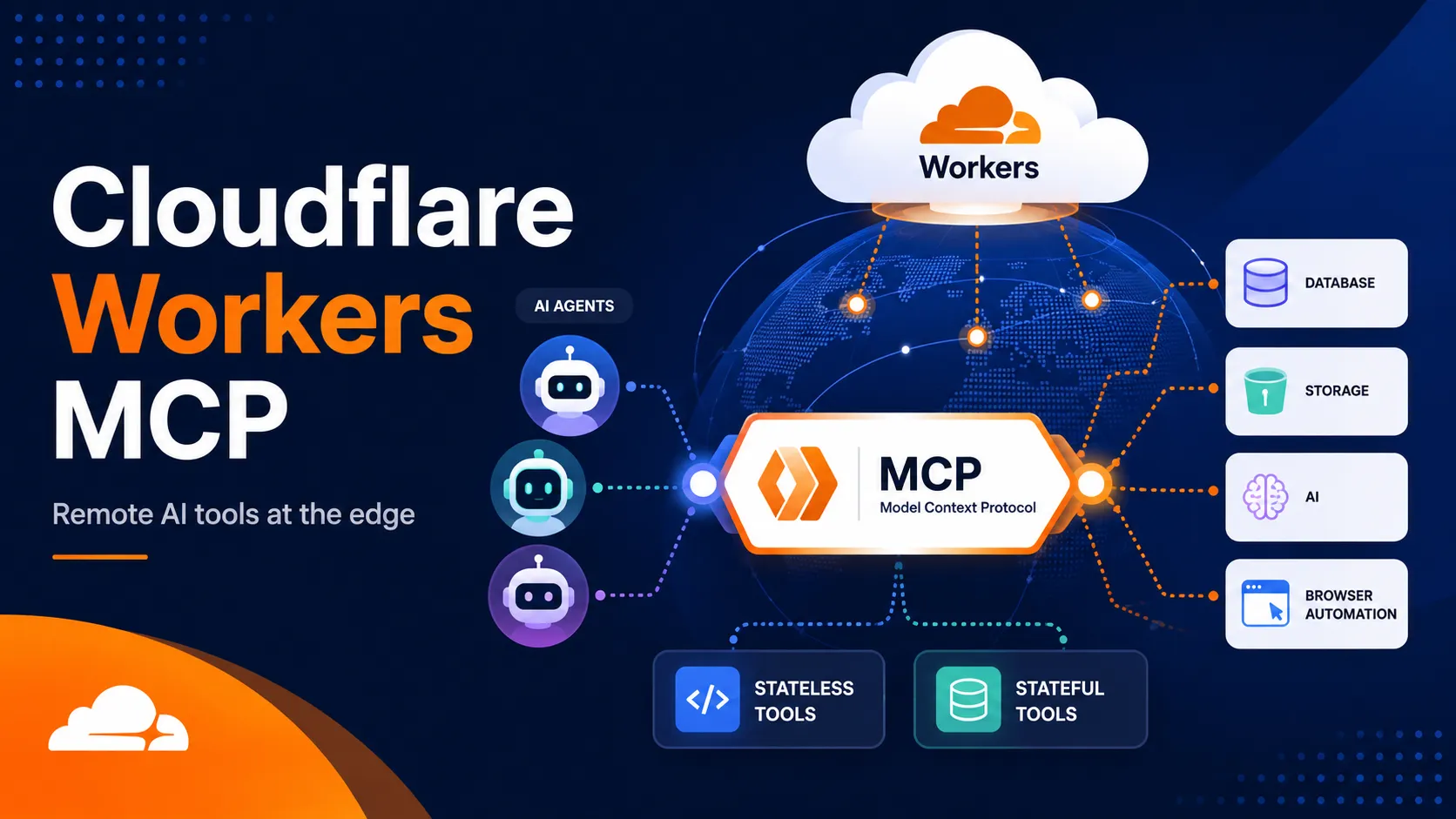
Cloudflare Workers MCP refers to the capability and tooling for building and hosting remote Model Context Protocol (MCP) servers on Cloudflare's serverless edge platform. Using official templates, the workers-mcp package, and the Agents SDK, developers can create MCP-compatible tools that AI agents (such as those in Claude or Cursor) can discover and invoke over the internet.
MCP acts as a standardized interface (often compared to USB-C for AI) allowing agents to interact with external capabilities without custom integrations for each service.
Features
- Streamable HTTP transport as the current MCP standard for remote servers.
- Support for both stateless tools (via
createMcpHandler()) and stateful servers (viaMcpAgentwith Durable Objects). - Seamless integration with Cloudflare services including Workers AI, D1, R2, KV, Browser Rendering, and more.
- JSDoc-annotated TypeScript methods automatically translated into discoverable MCP tools.
- Built-in support for authentication and authorization (OAuth providers or Cloudflare Access).
- Global low-latency deployment on Cloudflare's edge network.
- Local development and testing with MCP Inspector and Wrangler.
How It Works
A Cloudflare Worker runs the MCP server logic. Remote MCP clients connect to the deployed endpoint (typically https://your-worker.workers.dev/mcp) using Streamable HTTP. The workers-mcp package provides CLI tooling and ProxyToSelf logic to convert Worker methods into MCP tools exposed via a local proxy when needed. Official templates handle routing, schema generation, and transport.
For custom Workers, developers define tools as async methods with JSDoc comments for parameter and return documentation that agents can understand.
Use Cases
- Expose custom business logic or APIs as agent-callable tools.
- Build agentic workflows that interact with Cloudflare infrastructure (e.g., deploy Workers, query databases, generate images via Workers AI).
- Create production remote MCP servers with user authentication and scoped permissions.
- Integrate serverless functions into coding agents or desktop AI tools for automation and data access.
- Develop stateful experiences with Durable Objects for per-session memory or complex orchestration.
Cloudflare also provides managed MCP servers (e.g., for API access or specific products) as examples of this pattern in action.
MCP Setup
Prerequisites
- Cloudflare account
- Node.js and npm
- Wrangler CLI (npm install -g wrangler recommended)
Access requirements
- Cloudflare account required to deploy Workers
- For OAuth examples: GitHub or other provider account and OAuth app creation
Client setup
Claude Desktop
Transport: other
npx mcp-remote https://your-worker.workers.dev/mcp
{
  "mcpServers": {
    "your-mcp-server": {
      "command": "npx",
      "args": ["mcp-remote", "https://your-worker.workers.dev/mcp"]
    }
  }
}
- Deploy your MCP server to Cloudflare Workers to obtain the /mcp endpoint URL.
- Install mcp-remote if not present.
- Add the configuration to Claude Desktop settings (Developer tab > Edit config).
- Restart Claude Desktop.
Auth:
- For authenticated servers: Complete OAuth flow (browser sign-in) when prompted by the client or during tool use.
Uses mcp-remote local proxy for remote Streamable HTTP endpoints. Exact command may vary by server URL.
Cursor
Not documented specifically; general MCP client configuration for remote HTTP endpoints applies.
Claude Code
Not documented specifically.
Other MCP Clients
Transport: http
- Connect directly to the deployed remote endpoint URL (e.g. https://your-worker.workers.dev/mcp) if the client supports remote Streamable HTTP.
- Use MCP Inspector (npx @modelcontextprotocol/inspector) for testing.
Auth:
- Complete any OAuth or Access login flow required by the server.
Streamable HTTP is the standard transport for remote Cloudflare-hosted MCP servers.
Authorization flow
- For authless servers: No login required; connect directly to the public /mcp endpoint.
- For OAuth-enabled servers (e.g. GitHub): Create OAuth apps for dev and production, set client ID/secret as Wrangler secrets or in .env, deploy with KV namespace for state.
- Users authenticate via browser redirect during client connection or first tool use.
- Scoped permissions based on OAuth provider and Cloudflare Access policies where configured.
Environment variables
GITHUB_CLIENT_ID / GITHUB_CLIENT_SECRET (for GitHub OAuth examples)COOKIE_ENCRYPTION_KEY (for production OAuth)
Setup docs: https://developers.cloudflare.com/agents/model-context-protocol/guides/remote-mcp-server/
Tags
Alternatives
Comparable tools and resources explicitly connected to Cloudflare Workers MCP.
Related Entries
Keep exploring similar tools and resources in this category.






Related Reads
Background, tutorials, and protocol context connected to this entry.
Railway Agent Sandbox: The Practical Guide to Running AI Coding Agents Safely in the Cloud

Was ist OmniShow? Das KI-Framework, das die Generierung von Human-Object-Interaction-Videos revolutioniert
