LiteLLM Supply Chain Attack: Full Analysis of the 2026 Malicious Code Injection and Emergency Response Guide
Key Takeaways
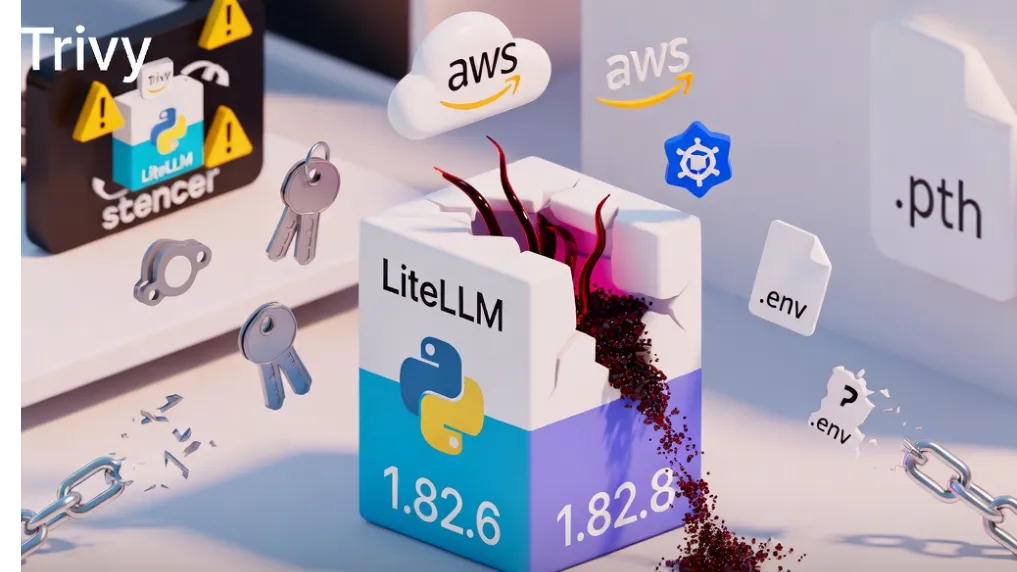
- Affected Versions: LiteLLM 1.82.7 and 1.82.8 on PyPI were injected with malicious code and have been taken down. The last safe version is 1.82.6.
- Attack Mechanism: Version 1.82.7 hid the payload in
proxy_server.py; version 1.82.8 additionally used a Python.pthfile (litellm_init.pth) that executes automatically on any Python process startup without needing to import LiteLLM. - Stolen Data: SSH private keys, AWS/GCP/Azure credentials, Kubernetes configs and Secrets,
.envfiles, cryptocurrency wallets, database passwords, Git credentials, shell history, and more. - Three-Stage Attack: Credential harvesting → Kubernetes lateral movement (creating privileged Pods) → Persistence via disguised systemd service (
sysmon.service). - Root Cause: Attackers compromised the Trivy security scanner earlier, gained LiteLLM maintainer’s PyPI publishing rights, and bypassed normal CI/CD to upload malicious packages directly.
- Exposure Window: Malicious versions were live for only 1–2 hours before a fork bomb flaw caused developer machines to crash, leading to discovery.
- Impact Scope: LiteLLM has over 95 million monthly downloads and is indirectly depended on by many AI agent systems, MCP servers, and LLM orchestration projects.
Timeline and Attack Details
On March 24, 2026, the popular LiteLLM library — a unified API wrapper for over 100 LLM providers — suddenly had anomalous versions appear on PyPI. The threat actor TeamPCP (previously responsible for attacks on Trivy and KICS) used compromised maintainer credentials or PyPI tokens to release two malicious versions.
Version 1.82.7:
- Malicious payload hidden inside
litellm/proxy/proxy_server.py. - Triggered only when importing the module or running
litellm --proxy. - Payload was double base64-encoded Python script.
Version 1.82.8 (more destructive):
- Additionally planted
litellm_init.pthfile. - Python’s
sitemodule automatically executes.pthfiles on interpreter startup, enabling zero-interaction triggering. - This meant even projects that never explicitly used LiteLLM could be infected if the package was present in their environment.
The malware used hybrid encryption (AES-256-CBC + RSA-4096) to exfiltrate data to the fake domain models.litellm.cloud.
Technical Breakdown of the Malicious Payload
Analysis reveals the payload operated in three distinct stages:
-
Credential Harvesting Stage:
- Recursively scanned common paths:
~/.ssh/,~/.aws/,~/.kube/,~/.azure/,.envfiles, Kubernetes configs, Git credentials, etc. - Extracted environment variables, in-memory secrets, cloud metadata endpoints (IMDS), and multiple cryptocurrency wallet files.
- Recursively scanned common paths:
-
Lateral Movement Stage (Kubernetes environments):
- Used ServiceAccount tokens to read cluster-wide Secrets.
- Created privileged
alpine:latestPods in thekube-systemnamespace on every node, mounting the host filesystem.
-
Persistence Stage:
- Deployed a backdoor disguised as a “system telemetry service” (
sysmon.py+ systemd user service). - Periodically pulled additional payloads from domains such as
checkmarx.zone.
- Deployed a backdoor disguised as a “system telemetry service” (
Discovery Trigger: The malicious code’s subprocess.Popen calls created an exponential fork bomb under the .pth mechanism, rapidly exhausting memory and crashing machines — a flaw that inadvertently exposed the attack.
Why LiteLLM Was a High-Value Target
LiteLLM serves as a universal proxy supporting 100+ LLM providers and is widely used in production AI agent systems, MCP servers, and multi-model routing. Developers often replace underlying calls with a single line of code, meaning sensitive API keys frequently coexist in the same environment.
The supply chain attack chain was clear: Trivy compromise → LiteLLM CI/CD relying on Trivy → Publishing rights leak → Direct malicious upload to PyPI. This highlights the critical importance of “trust but verify” in today’s open-source ecosystem.
Immediate Actions: Detection and Cleanup Steps
Step 1: Check Installed Version
pip show litellm
pip list | grep litellm
If version 1.82.7 or 1.82.8 is found, remove it immediately:
pip uninstall litellm -y
pip install litellm==1.82.6 --force-reinstall
Step 2: Clean Python Cache and site-packages
- Delete
site-packages/litellm*directories and any.pthfiles. - Purge pip cache:
pip cache purge
Step 3: Rotate All Credentials
- Immediately rotate SSH keys, all cloud access keys (AWS IAM, GCP Service Accounts, Azure AD), Kubernetes tokens, database passwords, and CI/CD secrets.
- Review cloud audit logs (CloudTrail, Audit Logs, Activity Log) for suspicious access.
Step 4: Extra Checks for Kubernetes Environments
- Scan
kube-systemnamespace for suspicious Pods. - Look for
~/.config/sysmon/directories and rogue systemd services on nodes. - Rebuild affected nodes (strongly recommended).
Step 5: Scan Dependent Projects
- Audit all
requirements.txt,pyproject.toml, and Docker images; pin LiteLLM to==1.82.6. - Use tools like
pip-auditorsafetyto scan environments.
Advanced Mitigation and Best Practices
- Pin Versions: Always lock LiteLLM to
==1.82.6(or newer safe version) in production using Poetry, Pipenv, or similar. - Supply Chain Scanning: Integrate Dependabot, Snyk, JFrog Xray, or Endor Labs to monitor PyPI package changes.
- Least Privilege: Avoid mixing development and production credentials; use dedicated Secrets Managers (AWS Secrets Manager, HashiCorp Vault).
- Air-gapped Installation: For high-security environments, build from verified GitHub source and check hashes.
- Monitoring: Deploy EDR solutions to watch for
.pthfile creation, abnormal fork behavior, and outbound connections to suspicious domains.
Edge Cases:
- Indirect installation via CLI scripts (
install.sh) also exposes systems. - Docker images based on compromised base images must be rebuilt.
- Virtual environments (venv) are isolated but global Python installations still affect system processes.
Conclusion
The LiteLLM supply chain attack serves as a stark reminder that the convenience of open-source ecosystems comes with serious security risks. By compromising a security scanner first, attackers achieved precise downstream impact.
Act Now: Check every Python environment for LiteLLM versions, downgrade to 1.82.6, and rotate all potentially exposed credentials immediately. Establish strict dependency review processes to prevent future incidents.
Stay updated via the official LiteLLM GitHub and PyPI announcements. In 2026 and beyond, regular dependency auditing is an essential skill for every AI developer.
Stay vigilant and protect the supply chain — starting with version pinning today.
Continue Reading
More articles connected to the same themes, protocols, and tools.


Referenced Tools
Browse entries that are adjacent to the topics covered in this article.

Hyper3D MCP
MCP ServersHyper3D MCP is Hyper3D's hosted Rodin MCP server for creating 3D assets from natural-language instructions or supported references, checking asynchronous generation progress, and retrieving model download links inside AI coding clients. Official setup is documented for Codex, Claude Code, and Kimi Code CLI.