Bitbucket MCP
Model Context Protocol (MCP) server for Bitbucket Cloud and Server that lets AI assistants like Cursor manage repositories, pull requests, pipelines, and more through natural language.
Overview
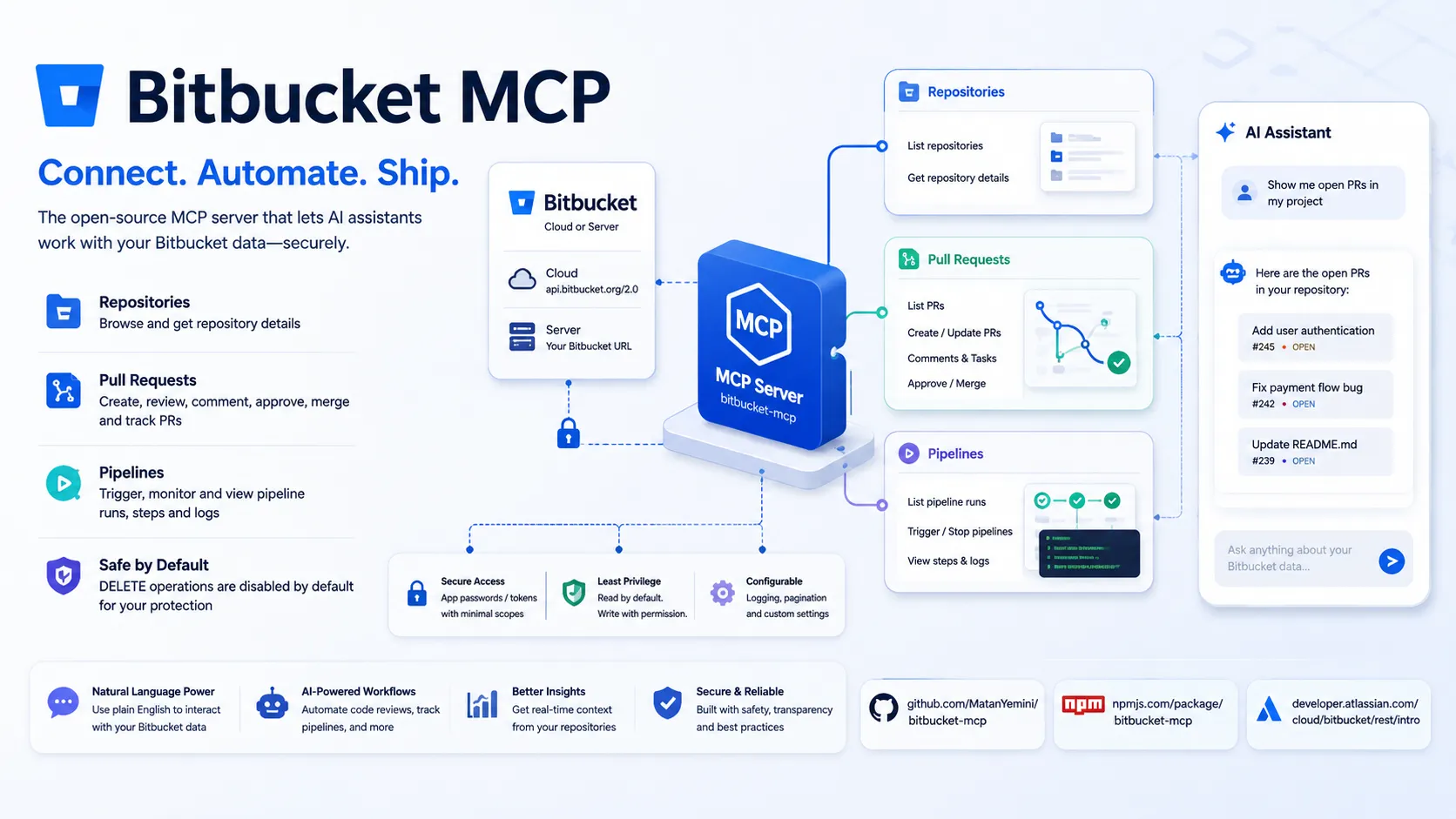
Bitbucket MCP is an open-source Model Context Protocol (MCP) server for integrating with Bitbucket Cloud and Bitbucket Server/Data Center APIs. It enables AI assistants (such as Cursor) to interact securely with your Bitbucket repositories, pull requests, pipelines, and other resources directly through natural language prompts.
This server implements the MCP standard and is published on npm as bitbucket-mcp.
Features
- Repository operations: list repositories and retrieve details
- Pull request lifecycle: list, get, create, update, merge, approve, decline, add/view comments, diffs, and tasks
- Pipeline operations: list runs, trigger/stop pipelines, view steps and logs
- Pagination support (
pagelen,page,all,limit) - Safe-by-default design: DELETE operations are disabled unless
BITBUCKET_ENABLE_DANGEROUS=trueis explicitly set
Supported Operations
The server exposes tools for common Bitbucket workflows including repository browsing, PR management, code review automation, and pipeline monitoring. Full tool list and API mappings are defined in the source.
Security & Best Practices
- Requires Bitbucket app passwords (or access tokens) with minimal scopes (Repositories: Read; Pull requests: Read/Write; Pipelines: Read)
- No DELETE operations enabled by default
- Configurable logging (file-based or disabled)
- Supports both Bitbucket Cloud (
https://api.bitbucket.org/2.0) and self-hosted Bitbucket Server via configurableBITBUCKET_URL
Compatibility
Works with any MCP-compatible AI runtime. Primary integration examples focus on Cursor, with support for Bitbucket Cloud and Server.
Links
MCP Setup
Prerequisites
- Node.js required (for npx/npm)
- Bitbucket account with app password or access token
Access requirements
- Bitbucket app password (Repositories: Read, Pull requests: Read/Write, Pipelines: Read) or access token required via environment variables
Client setup
Cursor
{
  "mcpServers": {
    "bitbucket": {
      "command": "npx",
      "env": {
        "BITBUCKET_URL": "https://api.bitbucket.org/2.0",
        "BITBUCKET_WORKSPACE": "your-workspace",
        "BITBUCKET_USERNAME": "your-username",
        "BITBUCKET_PASSWORD": "your-app-password"
      },
      "args": ["-y", "bitbucket-mcp@latest"]
    }
  }
}
- Create or edit
.cursor/mcp.jsonin your project root. - Paste the config block above and replace placeholders (
your-workspace,your-username,your-app-password) with your actual values.
Auth:
- Credentials are passed via environment variables in the MCP config. No browser sign-in or additional authorization steps required.
Legacy URL format (https://bitbucket.org/your-workspace) also supported for workspace auto-detection.
Claude Code
Not documented
Claude Desktop
Not documented
VS Code
Not documented
Codex
Not documented
Windsurf
Not documented
Lovable
Not documented
Other
Run via npx -y bitbucket-mcp@latest with required environment variables (see envVars). Configure in your MCP client using stdio/command transport.
Environment variables
BITBUCKET_URL (defaults to https://api.bitbucket.org/2.0)BITBUCKET_WORKSPACE (optional, auto-detected from URL in legacy mode)BITBUCKET_USERNAME (your Bitbucket email/username)BITBUCKET_PASSWORD (app password or API token)BITBUCKET_TOKEN (alternative to username/password)
Setup docs: https://github.com/MatanYemini/bitbucket-mcp
Tags
Related Entries
Keep exploring similar tools and resources in this category.

Hyper3D MCP
MCP ServersHyper3D MCP is Hyper3D's hosted Rodin MCP server for creating 3D assets from natural-language instructions or supported references, checking asynchronous generation progress, and retrieving model download links inside AI coding clients. Official setup is documented for Codex, Claude Code, and Kimi Code CLI.





Related Reads
Background, tutorials, and protocol context connected to this entry.