Context7: Revolutionizing AI Coding with Real-Time, Version-Specific Documentation
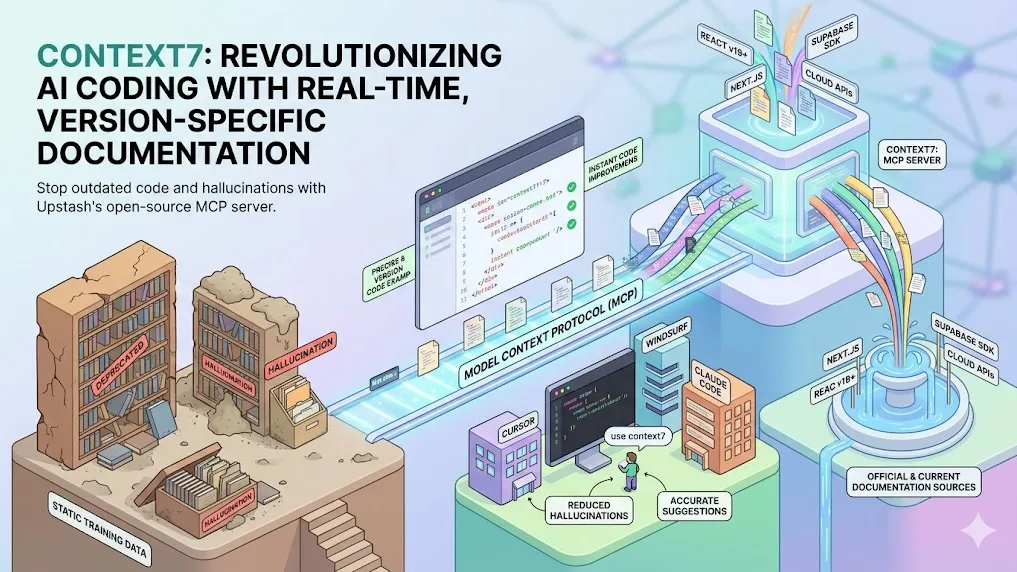
Key Takeaways
- Context7 is an open-source MCP (Model Context Protocol) server developed by Upstash that delivers real-time, version-specific documentation and code examples directly to LLMs and AI code editors.
- It dramatically reduces hallucinations and outdated code suggestions by pulling fresh content from official sources rather than relying on static training data.
- Simple integration via prompts like "use context7" enables seamless use in tools such as Cursor, Claude Code, Windsurf, and VS Code.
- Benchmarks and developer feedback indicate significant improvements in code accuracy, especially for rapidly evolving libraries and frameworks.
- Supports over thousands of libraries with intelligent ranking, version filtering, and minimal token usage for efficient context injection.
What Is Context7?
Context7 addresses one of the most persistent challenges in AI-assisted coding: Large Language Models' reliance on outdated or incomplete training data. When developers ask for code examples using modern libraries, LLMs frequently generate deprecated APIs, incorrect syntax, or entirely hallucinated functions.
Analysis shows that this issue becomes particularly acute with fast-moving ecosystems like React, Next.js, Supabase, or cloud SDKs where APIs change frequently. Context7 solves this by acting as an intermediary—MCP server—that fetches and injects official, up-to-date documentation into the LLM's context window at query time.
Developed by the Upstash team and open-sourced under MIT license, Context7 has rapidly gained adoption, reflected in strong community metrics and endorsements from platforms like Thoughtworks Technology Radar (Trial status as of late 2025).
How Context7 Works
Context7 operates through the Model Context Protocol (MCP), a standardized way for LLMs to access external tools and data sources.
Core Mechanism
- Library Resolution — When a prompt contains "use context7" or automatic invocation is configured, the server resolves the mentioned library name to a precise Context7-compatible ID.
- Documentation Retrieval — Using proprietary ranking and filtering, it pulls the most relevant, clean Markdown-formatted documentation—including code snippets—from official repositories.
- Version-Specific Filtering — Context7 detects project versions (e.g., Next.js 14 vs 15) and injects only matching content, preventing mismatches.
- Context Injection — Relevant sections are streamed into the LLM's context, typically using minimal tokens while maximizing relevance.
Key Technical Advantages
- No Hallucinations on APIs — Code examples come directly from source documentation.
- Dynamic Updates — Documentation refreshes automatically as upstream sources change.
- Token Efficiency — Intelligent ranking ensures only the most pertinent snippets are included.
- Multi-Tool Support — Works across MCP-compatible clients including Cursor, Claude Desktop, Windsurf, and custom integrations.
Benefits of Using Context7
Benchmarks and community reports consistently highlight several advantages:
- Higher Code Accuracy — Developers report 70-90% reduction in invalid or deprecated suggestions for framework-specific tasks.
- Faster Workflow — Eliminates the need to manually search docs, copy-paste snippets, or cross-reference versions.
- Better for Edge Cases — Handles niche libraries, beta features, and breaking changes where training data lags most.
- Improved Debugging & Refactoring — Provides current best practices when analyzing or updating legacy code.
Community feedback suggests that Context7 shines brightest in enterprise and production environments where code reliability directly impacts deployment success.
How to Set Up and Use Context7
Quick Start (MCP Mode)
- Visit https://context7.com/ and create an API key.
- Add the MCP provider to your AI code editor:
- Cursor: Settings → MCP Providers → Add Context7
- Claude Code / Windsurf: Follow similar MCP configuration steps
- In prompts, include use context7:
Show me how to implement email/password auth with Supabase in Next.js App Router. use context7
The server automatically resolves, fetches, and injects the latest docs.
Advanced Configuration
- Specify library IDs explicitly for precision:
/supabase/auth@2.0 - Set token budgets to balance detail vs. speed
- Use CLI mode for non-MCP environments
- Enterprise users can host private instances for internal libraries
Common Integration Examples
- Cursor + Context7: Automatic for most prompts mentioning libraries
- Claude Code: Combine with skills for even richer documentation handling
- VS Code Copilot: Via MCP extensions
Common Pitfalls and Advanced Tips
Pitfalls to Avoid
- Forgetting "use context7" — Without the trigger, the LLM falls back to stale knowledge.
- Ambiguous Library Names — "auth" alone may resolve incorrectly; prefer specific names.
- Overly Broad Prompts — Too vague queries can return less relevant docs.
- Ignoring Version Info — Not specifying versions can lead to mismatched examples in monorepos.
Pro Tips
- Chain with other MCPs (e.g., search + Context7) for hybrid research + docs workflows.
- Monitor token usage — Context7 is efficient but complex libraries can consume more context.
- For local-first needs, explore community alternatives inspired by Context7.
- Regularly check https://context7.com/rankings for most popular libraries and coverage updates.
Conclusion
Context7 represents a significant evolution in AI-assisted development by bridging the critical gap between static LLM knowledge and dynamic real-world documentation. As libraries evolve faster than model retraining cycles, tools like Context7 become essential infrastructure for reliable code generation.
Action step: Install Context7 today in your preferred AI code editor and test it on your current project's most frustrating library. The improvement in accuracy and speed is often immediately noticeable.
Explore the official site at https://context7.com/, review the GitHub repository at https://github.com/upstash/context7, or join developer discussions to see how others maximize its potential.
Continue Reading
More articles connected to the same themes, protocols, and tools.



Referenced Tools
Browse entries that are adjacent to the topics covered in this article.





Hyper3D MCP
MCP ServersHyper3D MCP is Hyper3D's hosted Rodin MCP server for creating 3D assets from natural-language instructions or supported references, checking asynchronous generation progress, and retrieving model download links inside AI coding clients. Official setup is documented for Codex, Claude Code, and Kimi Code CLI.