
X MCP
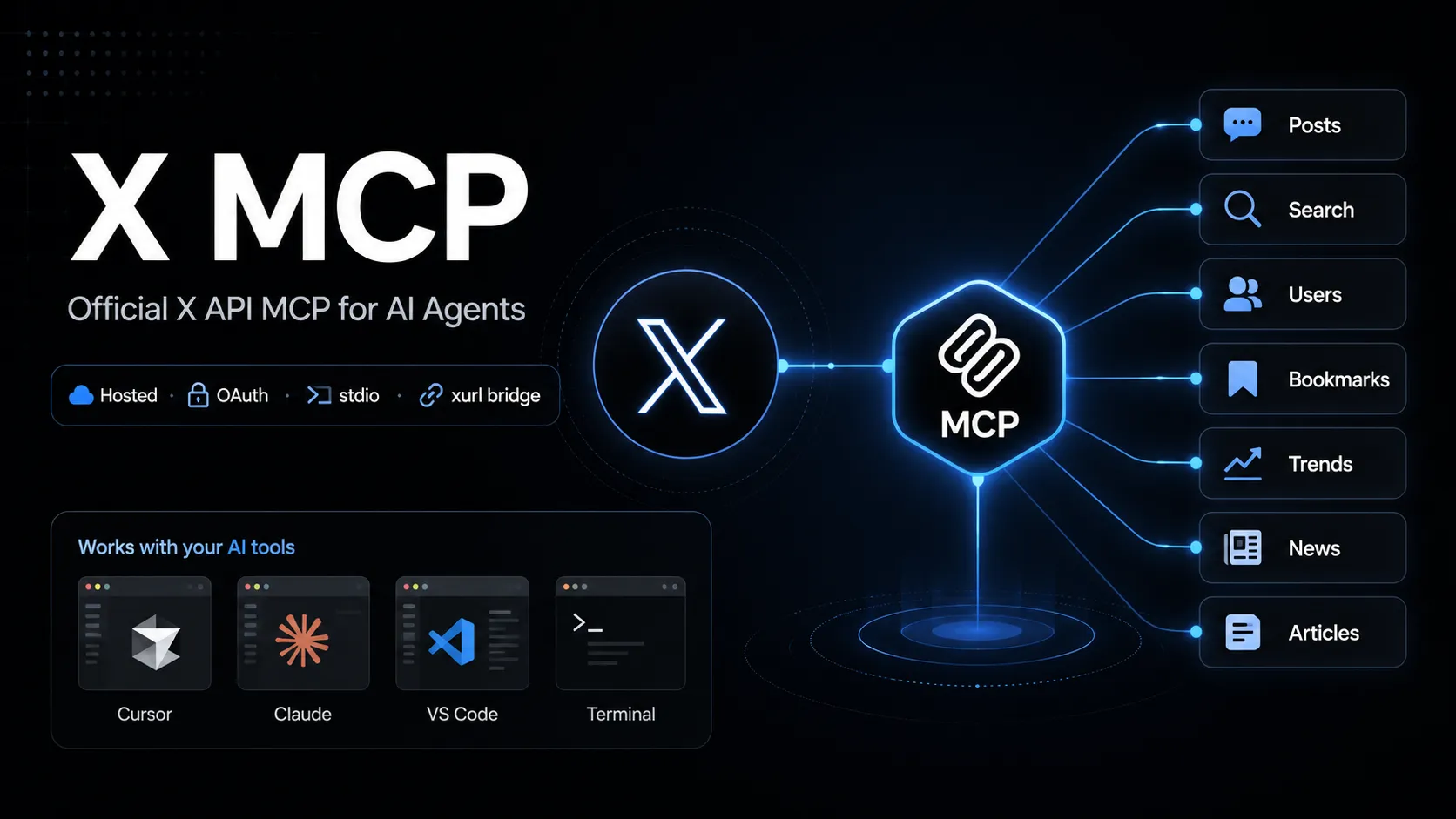
X MCP, X का आधिकारिक hosted Model Context Protocol server है, जो MCP-compatible AI tools को X API endpoints call करने देता है। यह OAuth user context के लिए xurl bridge का उपयोग करता है और posts search, user lookup, bookmarks, trends, news और Articles जैसे workflows में काम आता है।
About
X MCP, X का official hosted MCP server है, जिसका उद्देश्य MCP-compatible AI tools को X API से जोड़ना है। X documentation API MCP endpoint को https://api.x.com/mcp के रूप में दिखाती है; local stdio clients आम तौर पर open-source xurl mcp bridge के ज़रिए connect करते हैं।
यह entry X API MCP server के लिए है, documentation search वाले X Docs MCP या मिलते-जुलते नाम वाले community Twitter/X MCP projects के लिए नहीं।
Key Features
- MCP-compatible tools को user के X account permissions के साथ X API capabilities call करने देता है।
- Official documentation में listed capability areas में posts, full-archive search, user search, user lookup, timelines, mentions, bookmarks, bookmark folders, news, trends और Articles शामिल हैं।
xurlOAuth 2.0 user-context authentication, token caching और token refresh संभालता है।- Static Bearer token attach कर सकने वाले clients के लिए read endpoints का app-only direct URL mode भी documented है।
Use Cases
- Live X search या user context की ज़रूरत वाले social listening और research workflows।
- Bookmark management, timeline lookup, mentions review और Article drafting जैसे agent-assisted account workflows।
- AI tools से X API operations prototype करना, जबकि client X की documented API surface से जुड़ा रहता है।
Setup or Requirements
X MCP के लिए X Developer Platform account और OAuth-enabled X app चाहिए। Detailed commands, config blocks और authorization flow mcpSetup में दिए गए हैं।
Compatibility
X, Grok Build, Cursor, Claude Desktop, VS Code with GitHub Copilot Agent mode और generic MCP-compatible clients के setup paths document करता है। Checked official X MCP page पर Claude Code, Codex, Windsurf और Lovable के अलग public setup instructions confirm नहीं हुए।
Limitations
Hosted X API MCP server X API access, app configuration, OAuth scopes, rate limits और account permissions पर निर्भर करता है। कुछ operations के लिए specific API package, Production environment enrollment या suitable scopes की ज़रूरत हो सकती है।
Official page capability areas और setup paths बताती है, लेकिन exposed MCP tool names की stable complete public inventory confirm नहीं हुई।
Sources
- Official X MCP documentation: https://docs.x.com/tools/mcp
- X Agent Resources: https://docs.x.com/tools/ai
- xurl GitHub repository: https://github.com/xdevplatform/xurl
- X API OpenAPI specification: https://api.x.com/2/openapi.json
MCP Setup
Prerequisites
- Node.js installed for npx
- X Developer Platform account
- OAuth 2.0-enabled X app
- Redirect URI registered on the X app, default http://localhost:8080/callback
- CLIENT_ID and CLIENT_SECRET from the X app
Access requirements
- First-run OAuth 2.0 browser sign-in for user-context access
- xurl caches and refreshes tokens under ~/.xurl
- X API access, scopes, app package, environment, and rate limits apply
- App-only direct URL mode is documented for read endpoints only
Companion app or plugin
Name: xurl CLI / @xdevplatform/xurl Install URL: https://github.com/xdevplatform/xurl
- Use npx in the MCP client config, or install xurl with Homebrew, npm, shell script, or Go.
- Run xurl mcp as the local stdio bridge to https://api.x.com/mcp.
xurl handles OAuth, token caching, token refresh, and Bearer-token injection for the hosted X MCP endpoint.
Client setup
Grok Build
Transport: stdio
grok mcp add xapi npx -e CLIENT_ID=YOUR_X_APP_CLIENT_ID -e CLIENT_SECRET=YOUR_X_APP_CLIENT_SECRET -- -y @xdevplatform/xurl mcp https://api.x.com/mcp
[mcp_servers.xapi]
command = "npx"
args = ["-y", "@xdevplatform/xurl", "mcp", "https://api.x.com/mcp"]
enabled = true
startup_timeout_sec = 300

[mcp_servers.xapi.env]
CLIENT_ID = "YOUR_X_APP_CLIENT_ID"
CLIENT_SECRET = "YOUR_X_APP_CLIENT_SECRET"
- Run the documented grok mcp add command or edit ~/.grok/config.toml.
- Verify with grok mcp doctor xapi and grok mcp list.
Auth:
- Complete the first-run X OAuth browser login.
Documented by X for Grok Build.
Cursor
Transport: stdio
npx -y @xdevplatform/xurl mcp https://api.x.com/mcp
{"mcpServers":{"xapi":{"command":"npx","args":["-y","@xdevplatform/xurl","mcp","https://api.x.com/mcp"],"env":{"CLIENT_ID":"YOUR_X_APP_CLIENT_ID","CLIENT_SECRET":"YOUR_X_APP_CLIENT_SECRET"}}}}
- Create ~/.cursor/mcp.json or .cursor/mcp.json.
- Open Cursor Settings > MCP and confirm xapi is connected.
Auth:
- Complete the first-run X OAuth browser login.
Documented by X for Cursor.
Claude Desktop
Transport: stdio
npx -y @xdevplatform/xurl mcp https://api.x.com/mcp
{"mcpServers":{"xapi":{"command":"npx","args":["-y","@xdevplatform/xurl","mcp","https://api.x.com/mcp"],"env":{"CLIENT_ID":"YOUR_X_APP_CLIENT_ID","CLIENT_SECRET":"YOUR_X_APP_CLIENT_SECRET"}}}}
- Edit claude_desktop_config.json and restart Claude Desktop.
Auth:
- Complete the first-run X OAuth browser login.
Documented by X for Claude Desktop.
VS Code
Transport: stdio
npx -y @xdevplatform/xurl mcp https://api.x.com/mcp
{"servers":{"xapi":{"type":"stdio","command":"npx","args":["-y","@xdevplatform/xurl","mcp","https://api.x.com/mcp"],"env":{"CLIENT_ID":"YOUR_X_APP_CLIENT_ID","CLIENT_SECRET":"YOUR_X_APP_CLIENT_SECRET"}}}}
- Add the server to .vscode/mcp.json for GitHub Copilot Agent mode.
Auth:
- Complete the first-run X OAuth browser login.
Documented by X for VS Code with GitHub Copilot Agent mode.
Claude Code
Exact public Claude Code setup is not documented on the checked official X MCP page.
Codex
Exact public Codex setup is not documented on the checked official X MCP page.
Windsurf
Exact public Windsurf setup is not documented on the checked official X MCP page.
Lovable
Exact public Lovable setup is not documented on the checked official X MCP page.
Other
Transport: stdio
npx -y @xdevplatform/xurl mcp https://api.x.com/mcp
{"mcpServers":{"xapi":{"command":"npx","args":["-y","@xdevplatform/xurl","mcp","https://api.x.com/mcp"],"env":{"CLIENT_ID":"YOUR_X_APP_CLIENT_ID","CLIENT_SECRET":"YOUR_X_APP_CLIENT_SECRET"},"startup_timeout_sec":300}}}
- Use the universal stdio MCP configuration in any compatible client.
- Set startup timeout to 300 seconds or more if supported.
Auth:
- Complete the first-run browser OAuth flow.
- For headless machines, authenticate first with xurl auth oauth2 --headless.
If xurl is installed natively, X documents replacing command npx with command xurl and args ["mcp", "https://api.x.com/mcp"].
Other
Transport: HTTP
{"mcpServers":{"xapi_direct":{"url":"https://api.x.com/mcp","headers":{"Authorization":"Bearer YOUR_APP_ONLY_BEARER_TOKEN"}}}}
- Use only with MCP clients that support remote MCP endpoints with custom headers.
Auth:
- Provide an app-only Bearer token from the X Developer Platform.
Read-endpoint trade-off: no auto-refresh and no user context. The xurl bridge is recommended for full functionality.
Authorization flow
- Create an OAuth 2.0-enabled X app in the X Developer Portal.
- Register http://localhost:8080/callback or set and register REDIRECT_URI.
- Set CLIENT_ID and CLIENT_SECRET in the MCP client environment or register them in xurl.
- Start the MCP client and complete the one-time browser OAuth flow.
- For headless hosts, run xurl auth oauth2 --headless first.
Environment variables
CLIENT_IDCLIENT_SECRETREDIRECT_URI optionalAUTH_URL optionalTOKEN_URL optionalAPI_BASE_URL optionalINFO_URL optional
Setup docs: https://docs.x.com/tools/mcp
Tags
Alternatives
Comparable tools and resources explicitly connected to X MCP.
Related Entries
Keep exploring similar tools and resources in this category.

Hyper3D MCP
MCP ServersHyper3D MCP is Hyper3D's hosted Rodin MCP server for creating 3D assets from natural-language instructions or supported references, checking asynchronous generation progress, and retrieving model download links inside AI coding clients. Official setup is documented for Codex, Claude Code, and Kimi Code CLI.





Related Reads
Background, tutorials, and protocol context connected to this entry.