
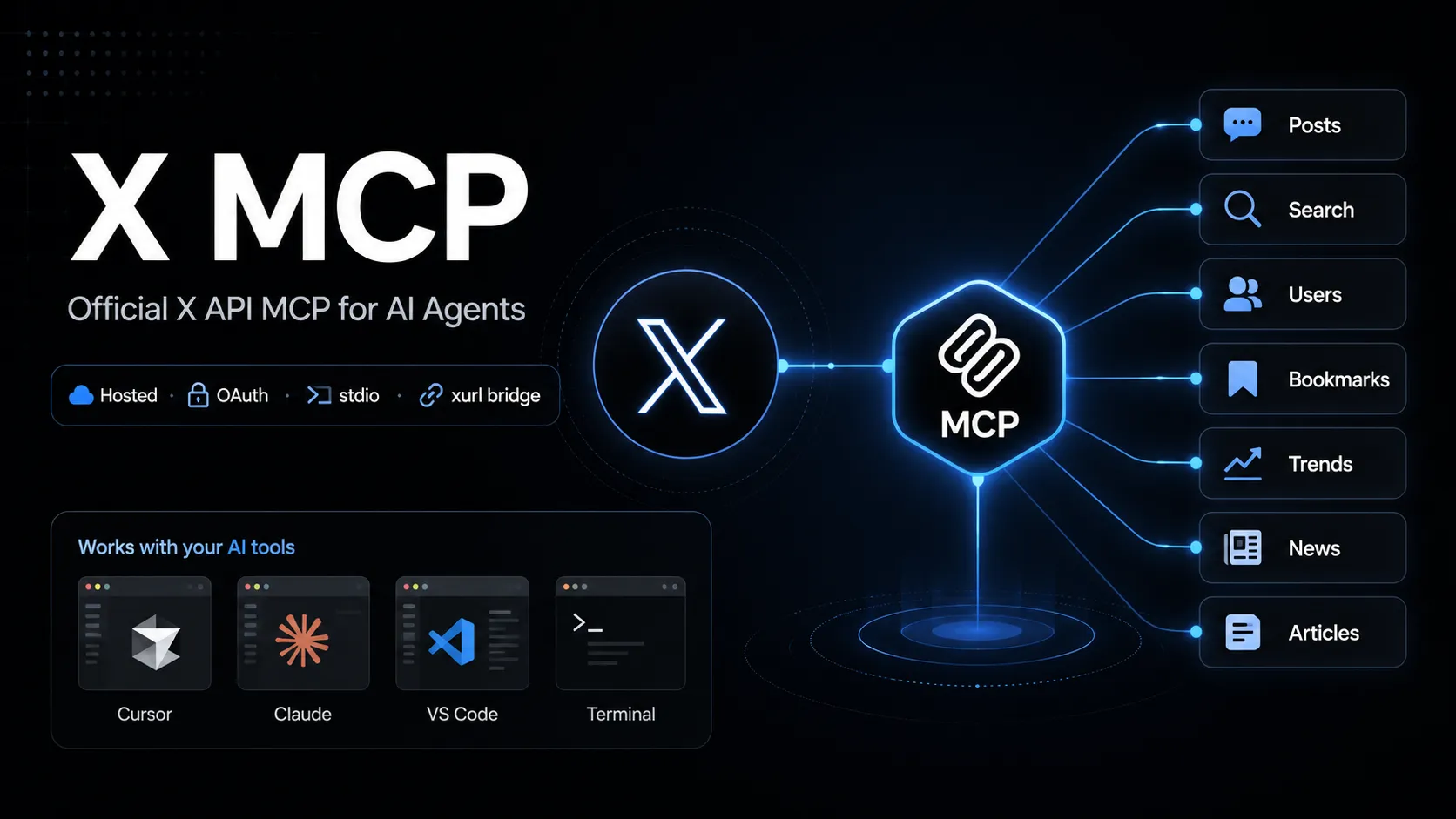
X MCP
X MCP 是 X 官方托管的 Model Context Protocol 服务器,可让兼容 MCP 的 AI 工具调用 X API 端点。它通过 xurl 桥接 OAuth 用户上下文,支持帖子搜索、用户查询、书签、趋势、新闻和 Articles 等工作流。
About
X MCP 是 X 官方托管的 MCP 服务器,用于把兼容 MCP 的 AI 工具连接到 X API。X 文档将 API MCP 端点标为 https://api.x.com/mcp ;本地 stdio 客户端通常通过开源的 xurl mcp 桥接连接。
本条目对应 X API MCP 服务器,不是单独用于文档搜索的 X Docs MCP,也不是名称相近的社区 Twitter/X MCP 项目。
Key Features
- 让兼容 MCP 的工具以用户的 X 账号权限调用 X API 能力。
- 官方文档列出的能力范围包括 posts、full-archive search、user search、user lookup、timelines、mentions、bookmarks、bookmark folders、news、trends 和 Articles。
- 使用
xurl完成 OAuth 2.0 用户上下文认证、令牌缓存和刷新。 - 对可附加静态 Bearer token 的客户端,文档也说明了用于读取端点的 app-only direct URL 模式。
Use Cases
- 需要实时 X 搜索或用户上下文的社媒监听与研究工作流。
- 由智能体辅助处理书签、时间线查询、mentions 复查和 Article 草稿。
- 在 AI 工具里快速原型化 X API 操作,同时保持连接到 X 官方文档描述的 API 面。
Setup or Requirements
X MCP 需要 X Developer Platform 账号和启用 OAuth 的 X app。详细命令、配置块和授权流程见 mcpSetup。
Compatibility
X 官方文档提供了 Grok Build、Cursor、Claude Desktop、VS Code with GitHub Copilot Agent mode 以及通用 MCP 客户端的设置路径。检查到的官方 X MCP 页面未确认 Claude Code、Codex、Windsurf 和 Lovable 的独立公开设置说明。
Limitations
托管的 X API MCP 服务器依赖 X API 访问权限、app 配置、OAuth scopes、速率限制和账号权限。部分操作可能需要特定 API package、Production environment enrollment 或合适的 scopes。
官方页面说明了能力范围和设置路径,但未确认一个稳定完整的所有 MCP tool 名称清单。
Sources
- Official X MCP documentation: https://docs.x.com/tools/mcp
- X Agent Resources: https://docs.x.com/tools/ai
- xurl GitHub repository: https://github.com/xdevplatform/xurl
- X API OpenAPI specification: https://api.x.com/2/openapi.json
MCP Setup
Prerequisites
- Node.js installed for npx
- X Developer Platform account
- OAuth 2.0-enabled X app
- Redirect URI registered on the X app, default http://localhost:8080/callback
- CLIENT_ID and CLIENT_SECRET from the X app
Access requirements
- First-run OAuth 2.0 browser sign-in for user-context access
- xurl caches and refreshes tokens under ~/.xurl
- X API access, scopes, app package, environment, and rate limits apply
- App-only direct URL mode is documented for read endpoints only
Companion app or plugin
Name: xurl CLI / @xdevplatform/xurl Install URL: https://github.com/xdevplatform/xurl
- Use npx in the MCP client config, or install xurl with Homebrew, npm, shell script, or Go.
- Run xurl mcp as the local stdio bridge to https://api.x.com/mcp.
xurl handles OAuth, token caching, token refresh, and Bearer-token injection for the hosted X MCP endpoint.
Client setup
Grok Build
Transport: stdio
grok mcp add xapi npx -e CLIENT_ID=YOUR_X_APP_CLIENT_ID -e CLIENT_SECRET=YOUR_X_APP_CLIENT_SECRET -- -y @xdevplatform/xurl mcp https://api.x.com/mcp
[mcp_servers.xapi]
command = "npx"
args = ["-y", "@xdevplatform/xurl", "mcp", "https://api.x.com/mcp"]
enabled = true
startup_timeout_sec = 300

[mcp_servers.xapi.env]
CLIENT_ID = "YOUR_X_APP_CLIENT_ID"
CLIENT_SECRET = "YOUR_X_APP_CLIENT_SECRET"
- Run the documented grok mcp add command or edit ~/.grok/config.toml.
- Verify with grok mcp doctor xapi and grok mcp list.
Auth:
- Complete the first-run X OAuth browser login.
Documented by X for Grok Build.
Cursor
Transport: stdio
npx -y @xdevplatform/xurl mcp https://api.x.com/mcp
{"mcpServers":{"xapi":{"command":"npx","args":["-y","@xdevplatform/xurl","mcp","https://api.x.com/mcp"],"env":{"CLIENT_ID":"YOUR_X_APP_CLIENT_ID","CLIENT_SECRET":"YOUR_X_APP_CLIENT_SECRET"}}}}
- Create ~/.cursor/mcp.json or .cursor/mcp.json.
- Open Cursor Settings > MCP and confirm xapi is connected.
Auth:
- Complete the first-run X OAuth browser login.
Documented by X for Cursor.
Claude Desktop
Transport: stdio
npx -y @xdevplatform/xurl mcp https://api.x.com/mcp
{"mcpServers":{"xapi":{"command":"npx","args":["-y","@xdevplatform/xurl","mcp","https://api.x.com/mcp"],"env":{"CLIENT_ID":"YOUR_X_APP_CLIENT_ID","CLIENT_SECRET":"YOUR_X_APP_CLIENT_SECRET"}}}}
- Edit claude_desktop_config.json and restart Claude Desktop.
Auth:
- Complete the first-run X OAuth browser login.
Documented by X for Claude Desktop.
VS Code
Transport: stdio
npx -y @xdevplatform/xurl mcp https://api.x.com/mcp
{"servers":{"xapi":{"type":"stdio","command":"npx","args":["-y","@xdevplatform/xurl","mcp","https://api.x.com/mcp"],"env":{"CLIENT_ID":"YOUR_X_APP_CLIENT_ID","CLIENT_SECRET":"YOUR_X_APP_CLIENT_SECRET"}}}}
- Add the server to .vscode/mcp.json for GitHub Copilot Agent mode.
Auth:
- Complete the first-run X OAuth browser login.
Documented by X for VS Code with GitHub Copilot Agent mode.
Claude Code
Exact public Claude Code setup is not documented on the checked official X MCP page.
Codex
Exact public Codex setup is not documented on the checked official X MCP page.
Windsurf
Exact public Windsurf setup is not documented on the checked official X MCP page.
Lovable
Exact public Lovable setup is not documented on the checked official X MCP page.
Other
Transport: stdio
npx -y @xdevplatform/xurl mcp https://api.x.com/mcp
{"mcpServers":{"xapi":{"command":"npx","args":["-y","@xdevplatform/xurl","mcp","https://api.x.com/mcp"],"env":{"CLIENT_ID":"YOUR_X_APP_CLIENT_ID","CLIENT_SECRET":"YOUR_X_APP_CLIENT_SECRET"},"startup_timeout_sec":300}}}
- Use the universal stdio MCP configuration in any compatible client.
- Set startup timeout to 300 seconds or more if supported.
Auth:
- Complete the first-run browser OAuth flow.
- For headless machines, authenticate first with xurl auth oauth2 --headless.
If xurl is installed natively, X documents replacing command npx with command xurl and args ["mcp", "https://api.x.com/mcp"].
Other
Transport: HTTP
{"mcpServers":{"xapi_direct":{"url":"https://api.x.com/mcp","headers":{"Authorization":"Bearer YOUR_APP_ONLY_BEARER_TOKEN"}}}}
- Use only with MCP clients that support remote MCP endpoints with custom headers.
Auth:
- Provide an app-only Bearer token from the X Developer Platform.
Read-endpoint trade-off: no auto-refresh and no user context. The xurl bridge is recommended for full functionality.
Authorization flow
- Create an OAuth 2.0-enabled X app in the X Developer Portal.
- Register http://localhost:8080/callback or set and register REDIRECT_URI.
- Set CLIENT_ID and CLIENT_SECRET in the MCP client environment or register them in xurl.
- Start the MCP client and complete the one-time browser OAuth flow.
- For headless hosts, run xurl auth oauth2 --headless first.
Environment variables
CLIENT_IDCLIENT_SECRETREDIRECT_URI optionalAUTH_URL optionalTOKEN_URL optionalAPI_BASE_URL optionalINFO_URL optional
Setup docs: https://docs.x.com/tools/mcp
Tags
Alternatives
Comparable tools and resources explicitly connected to X MCP.
Related Entries
Keep exploring similar tools and resources in this category.

Hyper3D MCP
MCP ServersHyper3D MCP is Hyper3D's hosted Rodin MCP server for creating 3D assets from natural-language instructions or supported references, checking asynchronous generation progress, and retrieving model download links inside AI coding clients. Official setup is documented for Codex, Claude Code, and Kimi Code CLI.





Related Reads
Background, tutorials, and protocol context connected to this entry.