
X MCP
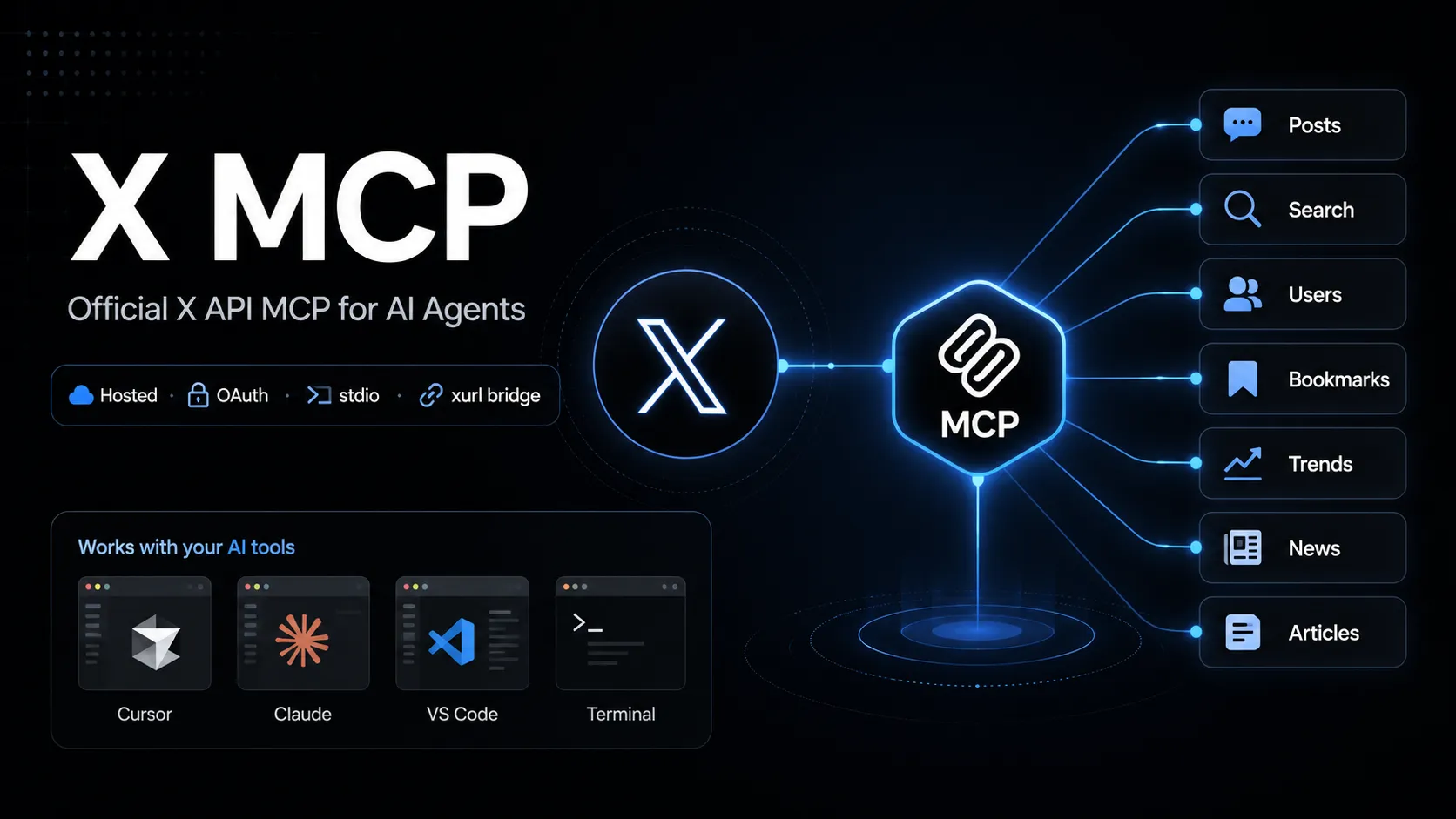
X MCP é o servidor Model Context Protocol oficial e hospedado da X para chamar endpoints da X API a partir de ferramentas compatíveis com MCP. Ele usa a ponte xurl para OAuth com contexto de usuário e cobre fluxos como busca de posts, usuários, bookmarks, tendências, notícias e Articles.
About
X MCP é o servidor MCP oficial e hospedado da X para conectar ferramentas de IA compatíveis com MCP à X API. A documentação da X identifica o endpoint API MCP como https://api.x.com/mcp; clientes locais via stdio normalmente se conectam por meio da ponte open-source xurl mcp.
Esta entrada se refere ao servidor X API MCP, não ao X Docs MCP usado para busca em documentação, nem a projetos comunitários Twitter/X MCP com nomes parecidos.
Key Features
- Permite que ferramentas compatíveis com MCP chamem recursos da X API com as permissões da conta X do usuário.
- As áreas documentadas incluem posts, full-archive search, user search, user lookup, timelines, mentions, bookmarks, bookmark folders, news, trends e Articles.
- Usa
xurlpara autenticação OAuth 2.0 com contexto de usuário, cache de tokens e renovação de tokens. - Também documenta um modo app-only direct URL para endpoints de leitura em clientes que podem anexar um Bearer token estático.
Use Cases
- Workflows de social listening e pesquisa que precisam de busca X ao vivo ou contexto de usuário.
- Workflows de conta assistidos por agente, como gestão de bookmarks, consulta de timeline, revisão de mentions e rascunhos de Articles.
- Prototipar ações da X API a partir de ferramentas de IA mantendo o cliente MCP conectado à superfície de API documentada pela X.
Setup or Requirements
X MCP requer uma conta X Developer Platform e uma X app com OAuth habilitado. Comandos, blocos de configuração e fluxo de autenticação detalhados estão em mcpSetup.
Compatibility
A X documenta caminhos de configuração para Grok Build, Cursor, Claude Desktop, VS Code with GitHub Copilot Agent mode e clientes MCP genéricos. As instruções públicas específicas para Claude Code, Codex, Windsurf e Lovable não foram confirmadas na página oficial X MCP verificada.
Limitations
O servidor X API MCP hospedado depende de acesso à X API, configuração da app, OAuth scopes, limites de taxa e permissões da conta. Algumas operações podem exigir API package específico, Production environment enrollment ou scopes adequados.
A página oficial descreve áreas de capacidade e caminhos de configuração, mas uma lista pública completa e estável de todos os nomes de ferramentas MCP expostas não foi confirmada.
Sources
- Official X MCP documentation: https://docs.x.com/tools/mcp
- X Agent Resources: https://docs.x.com/tools/ai
- xurl GitHub repository: https://github.com/xdevplatform/xurl
- X API OpenAPI specification: https://api.x.com/2/openapi.json
MCP Setup
Prerequisites
- Node.js installed for npx
- X Developer Platform account
- OAuth 2.0-enabled X app
- Redirect URI registered on the X app, default http://localhost:8080/callback
- CLIENT_ID and CLIENT_SECRET from the X app
Access requirements
- First-run OAuth 2.0 browser sign-in for user-context access
- xurl caches and refreshes tokens under ~/.xurl
- X API access, scopes, app package, environment, and rate limits apply
- App-only direct URL mode is documented for read endpoints only
Companion app or plugin
Name: xurl CLI / @xdevplatform/xurl Install URL: https://github.com/xdevplatform/xurl
- Use npx in the MCP client config, or install xurl with Homebrew, npm, shell script, or Go.
- Run xurl mcp as the local stdio bridge to https://api.x.com/mcp.
xurl handles OAuth, token caching, token refresh, and Bearer-token injection for the hosted X MCP endpoint.
Client setup
Grok Build
Transport: stdio
grok mcp add xapi npx -e CLIENT_ID=YOUR_X_APP_CLIENT_ID -e CLIENT_SECRET=YOUR_X_APP_CLIENT_SECRET -- -y @xdevplatform/xurl mcp https://api.x.com/mcp
[mcp_servers.xapi]
command = "npx"
args = ["-y", "@xdevplatform/xurl", "mcp", "https://api.x.com/mcp"]
enabled = true
startup_timeout_sec = 300

[mcp_servers.xapi.env]
CLIENT_ID = "YOUR_X_APP_CLIENT_ID"
CLIENT_SECRET = "YOUR_X_APP_CLIENT_SECRET"
- Run the documented grok mcp add command or edit ~/.grok/config.toml.
- Verify with grok mcp doctor xapi and grok mcp list.
Auth:
- Complete the first-run X OAuth browser login.
Documented by X for Grok Build.
Cursor
Transport: stdio
npx -y @xdevplatform/xurl mcp https://api.x.com/mcp
{"mcpServers":{"xapi":{"command":"npx","args":["-y","@xdevplatform/xurl","mcp","https://api.x.com/mcp"],"env":{"CLIENT_ID":"YOUR_X_APP_CLIENT_ID","CLIENT_SECRET":"YOUR_X_APP_CLIENT_SECRET"}}}}
- Create ~/.cursor/mcp.json or .cursor/mcp.json.
- Open Cursor Settings > MCP and confirm xapi is connected.
Auth:
- Complete the first-run X OAuth browser login.
Documented by X for Cursor.
Claude Desktop
Transport: stdio
npx -y @xdevplatform/xurl mcp https://api.x.com/mcp
{"mcpServers":{"xapi":{"command":"npx","args":["-y","@xdevplatform/xurl","mcp","https://api.x.com/mcp"],"env":{"CLIENT_ID":"YOUR_X_APP_CLIENT_ID","CLIENT_SECRET":"YOUR_X_APP_CLIENT_SECRET"}}}}
- Edit claude_desktop_config.json and restart Claude Desktop.
Auth:
- Complete the first-run X OAuth browser login.
Documented by X for Claude Desktop.
VS Code
Transport: stdio
npx -y @xdevplatform/xurl mcp https://api.x.com/mcp
{"servers":{"xapi":{"type":"stdio","command":"npx","args":["-y","@xdevplatform/xurl","mcp","https://api.x.com/mcp"],"env":{"CLIENT_ID":"YOUR_X_APP_CLIENT_ID","CLIENT_SECRET":"YOUR_X_APP_CLIENT_SECRET"}}}}
- Add the server to .vscode/mcp.json for GitHub Copilot Agent mode.
Auth:
- Complete the first-run X OAuth browser login.
Documented by X for VS Code with GitHub Copilot Agent mode.
Claude Code
Exact public Claude Code setup is not documented on the checked official X MCP page.
Codex
Exact public Codex setup is not documented on the checked official X MCP page.
Windsurf
Exact public Windsurf setup is not documented on the checked official X MCP page.
Lovable
Exact public Lovable setup is not documented on the checked official X MCP page.
Other
Transport: stdio
npx -y @xdevplatform/xurl mcp https://api.x.com/mcp
{"mcpServers":{"xapi":{"command":"npx","args":["-y","@xdevplatform/xurl","mcp","https://api.x.com/mcp"],"env":{"CLIENT_ID":"YOUR_X_APP_CLIENT_ID","CLIENT_SECRET":"YOUR_X_APP_CLIENT_SECRET"},"startup_timeout_sec":300}}}
- Use the universal stdio MCP configuration in any compatible client.
- Set startup timeout to 300 seconds or more if supported.
Auth:
- Complete the first-run browser OAuth flow.
- For headless machines, authenticate first with xurl auth oauth2 --headless.
If xurl is installed natively, X documents replacing command npx with command xurl and args ["mcp", "https://api.x.com/mcp"].
Other
Transport: HTTP
{"mcpServers":{"xapi_direct":{"url":"https://api.x.com/mcp","headers":{"Authorization":"Bearer YOUR_APP_ONLY_BEARER_TOKEN"}}}}
- Use only with MCP clients that support remote MCP endpoints with custom headers.
Auth:
- Provide an app-only Bearer token from the X Developer Platform.
Read-endpoint trade-off: no auto-refresh and no user context. The xurl bridge is recommended for full functionality.
Authorization flow
- Create an OAuth 2.0-enabled X app in the X Developer Portal.
- Register http://localhost:8080/callback or set and register REDIRECT_URI.
- Set CLIENT_ID and CLIENT_SECRET in the MCP client environment or register them in xurl.
- Start the MCP client and complete the one-time browser OAuth flow.
- For headless hosts, run xurl auth oauth2 --headless first.
Environment variables
CLIENT_IDCLIENT_SECRETREDIRECT_URI optionalAUTH_URL optionalTOKEN_URL optionalAPI_BASE_URL optionalINFO_URL optional
Setup docs: https://docs.x.com/tools/mcp
Tags
Alternatives
Comparable tools and resources explicitly connected to X MCP.
Related Entries
Keep exploring similar tools and resources in this category.

Hyper3D MCP
MCP ServersHyper3D MCP is Hyper3D's hosted Rodin MCP server for creating 3D assets from natural-language instructions or supported references, checking asynchronous generation progress, and retrieving model download links inside AI coding clients. Official setup is documented for Codex, Claude Code, and Kimi Code CLI.





Related Reads
Background, tutorials, and protocol context connected to this entry.