
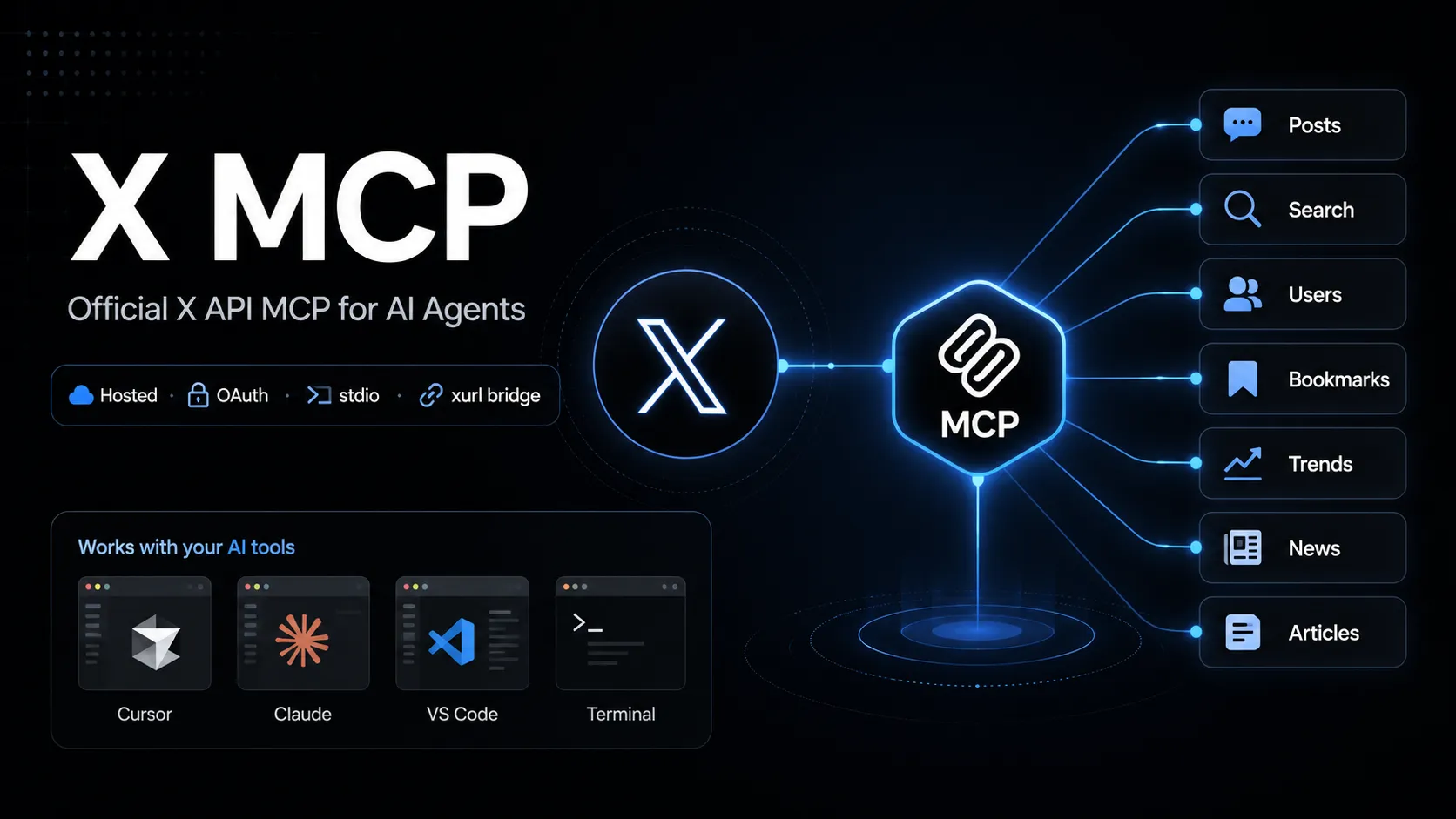
X MCP
X MCP는 MCP 호환 AI 도구에서 X API 엔드포인트를 호출할 수 있게 하는 X의 공식 호스팅 Model Context Protocol 서버입니다. xurl 브리지를 통해 OAuth 사용자 컨텍스트를 연결하며 게시물 검색, 사용자 조회, 북마크, 트렌드, 뉴스, Articles 워크플로에 활용할 수 있습니다.
About
X MCP는 MCP 호환 AI 도구를 X API에 연결하기 위한 X의 공식 호스팅 MCP 서버입니다. X 문서는 API MCP 엔드포인트를 https://api.x.com/mcp로 안내하며, 로컬 stdio 클라이언트는 일반적으로 오픈소스 xurl mcp 브리지를 통해 연결합니다.
이 항목은 X API MCP 서버를 다루며, 문서 검색용 X Docs MCP나 이름이 비슷한 커뮤니티 Twitter/X MCP 프로젝트와는 구분됩니다.
Key Features
- MCP 호환 도구가 사용자의 X 계정 권한으로 X API 기능을 호출할 수 있습니다.
- 공식 문서의 기능 범위에는 posts, full-archive search, user search, user lookup, timelines, mentions, bookmarks, bookmark folders, news, trends, Articles가 포함됩니다.
xurl을 사용해 OAuth 2.0 사용자 컨텍스트 인증, 토큰 캐싱, 토큰 갱신을 처리합니다.- 정적 Bearer token을 첨부할 수 있는 클라이언트에는 읽기 엔드포인트용 app-only direct URL 모드도 문서화되어 있습니다.
Use Cases
- 실시간 X 검색 또는 사용자 컨텍스트가 필요한 소셜 리스닝과 리서치 워크플로.
- 북마크 관리, 타임라인 조회, mentions 검토, Article 초안 작성 같은 계정 워크플로 자동화.
- AI 도구 안에서 X 공식 문서가 설명하는 API 표면에 연결한 채 X API 동작을 빠르게 프로토타이핑할 수 있습니다.
Setup or Requirements
X MCP에는 X Developer Platform 계정과 OAuth가 활성화된 X app이 필요합니다. 자세한 명령, 설정 블록, 인증 흐름은 mcpSetup에 정리되어 있습니다.
Compatibility
X는 Grok Build, Cursor, Claude Desktop, VS Code with GitHub Copilot Agent mode 및 일반 MCP 클라이언트용 설정 경로를 문서화합니다. 확인한 공식 X MCP 페이지에서는 Claude Code, Codex, Windsurf, Lovable의 별도 공개 설정 지침은 확인되지 않았습니다.
Limitations
호스팅 X API MCP 서버는 X API 접근 권한, app 설정, OAuth scopes, rate limits, 계정 권한에 의존합니다. 일부 작업은 특정 API package, Production environment enrollment 또는 적절한 scopes가 필요할 수 있습니다.
공식 페이지는 기능 범위와 설정 경로를 설명하지만, 노출되는 모든 MCP tool 이름의 안정적이고 완전한 공개 목록은 확인되지 않았습니다.
Sources
- Official X MCP documentation: https://docs.x.com/tools/mcp
- X Agent Resources: https://docs.x.com/tools/ai
- xurl GitHub repository: https://github.com/xdevplatform/xurl
- X API OpenAPI specification: https://api.x.com/2/openapi.json
MCP Setup
Prerequisites
- Node.js installed for npx
- X Developer Platform account
- OAuth 2.0-enabled X app
- Redirect URI registered on the X app, default http://localhost:8080/callback
- CLIENT_ID and CLIENT_SECRET from the X app
Access requirements
- First-run OAuth 2.0 browser sign-in for user-context access
- xurl caches and refreshes tokens under ~/.xurl
- X API access, scopes, app package, environment, and rate limits apply
- App-only direct URL mode is documented for read endpoints only
Companion app or plugin
Name: xurl CLI / @xdevplatform/xurl Install URL: https://github.com/xdevplatform/xurl
- Use npx in the MCP client config, or install xurl with Homebrew, npm, shell script, or Go.
- Run xurl mcp as the local stdio bridge to https://api.x.com/mcp.
xurl handles OAuth, token caching, token refresh, and Bearer-token injection for the hosted X MCP endpoint.
Client setup
Grok Build
Transport: stdio
grok mcp add xapi npx -e CLIENT_ID=YOUR_X_APP_CLIENT_ID -e CLIENT_SECRET=YOUR_X_APP_CLIENT_SECRET -- -y @xdevplatform/xurl mcp https://api.x.com/mcp
[mcp_servers.xapi]
command = "npx"
args = ["-y", "@xdevplatform/xurl", "mcp", "https://api.x.com/mcp"]
enabled = true
startup_timeout_sec = 300

[mcp_servers.xapi.env]
CLIENT_ID = "YOUR_X_APP_CLIENT_ID"
CLIENT_SECRET = "YOUR_X_APP_CLIENT_SECRET"
- Run the documented grok mcp add command or edit ~/.grok/config.toml.
- Verify with grok mcp doctor xapi and grok mcp list.
Auth:
- Complete the first-run X OAuth browser login.
Documented by X for Grok Build.
Cursor
Transport: stdio
npx -y @xdevplatform/xurl mcp https://api.x.com/mcp
{"mcpServers":{"xapi":{"command":"npx","args":["-y","@xdevplatform/xurl","mcp","https://api.x.com/mcp"],"env":{"CLIENT_ID":"YOUR_X_APP_CLIENT_ID","CLIENT_SECRET":"YOUR_X_APP_CLIENT_SECRET"}}}}
- Create ~/.cursor/mcp.json or .cursor/mcp.json.
- Open Cursor Settings > MCP and confirm xapi is connected.
Auth:
- Complete the first-run X OAuth browser login.
Documented by X for Cursor.
Claude Desktop
Transport: stdio
npx -y @xdevplatform/xurl mcp https://api.x.com/mcp
{"mcpServers":{"xapi":{"command":"npx","args":["-y","@xdevplatform/xurl","mcp","https://api.x.com/mcp"],"env":{"CLIENT_ID":"YOUR_X_APP_CLIENT_ID","CLIENT_SECRET":"YOUR_X_APP_CLIENT_SECRET"}}}}
- Edit claude_desktop_config.json and restart Claude Desktop.
Auth:
- Complete the first-run X OAuth browser login.
Documented by X for Claude Desktop.
VS Code
Transport: stdio
npx -y @xdevplatform/xurl mcp https://api.x.com/mcp
{"servers":{"xapi":{"type":"stdio","command":"npx","args":["-y","@xdevplatform/xurl","mcp","https://api.x.com/mcp"],"env":{"CLIENT_ID":"YOUR_X_APP_CLIENT_ID","CLIENT_SECRET":"YOUR_X_APP_CLIENT_SECRET"}}}}
- Add the server to .vscode/mcp.json for GitHub Copilot Agent mode.
Auth:
- Complete the first-run X OAuth browser login.
Documented by X for VS Code with GitHub Copilot Agent mode.
Claude Code
Exact public Claude Code setup is not documented on the checked official X MCP page.
Codex
Exact public Codex setup is not documented on the checked official X MCP page.
Windsurf
Exact public Windsurf setup is not documented on the checked official X MCP page.
Lovable
Exact public Lovable setup is not documented on the checked official X MCP page.
Other
Transport: stdio
npx -y @xdevplatform/xurl mcp https://api.x.com/mcp
{"mcpServers":{"xapi":{"command":"npx","args":["-y","@xdevplatform/xurl","mcp","https://api.x.com/mcp"],"env":{"CLIENT_ID":"YOUR_X_APP_CLIENT_ID","CLIENT_SECRET":"YOUR_X_APP_CLIENT_SECRET"},"startup_timeout_sec":300}}}
- Use the universal stdio MCP configuration in any compatible client.
- Set startup timeout to 300 seconds or more if supported.
Auth:
- Complete the first-run browser OAuth flow.
- For headless machines, authenticate first with xurl auth oauth2 --headless.
If xurl is installed natively, X documents replacing command npx with command xurl and args ["mcp", "https://api.x.com/mcp"].
Other
Transport: HTTP
{"mcpServers":{"xapi_direct":{"url":"https://api.x.com/mcp","headers":{"Authorization":"Bearer YOUR_APP_ONLY_BEARER_TOKEN"}}}}
- Use only with MCP clients that support remote MCP endpoints with custom headers.
Auth:
- Provide an app-only Bearer token from the X Developer Platform.
Read-endpoint trade-off: no auto-refresh and no user context. The xurl bridge is recommended for full functionality.
Authorization flow
- Create an OAuth 2.0-enabled X app in the X Developer Portal.
- Register http://localhost:8080/callback or set and register REDIRECT_URI.
- Set CLIENT_ID and CLIENT_SECRET in the MCP client environment or register them in xurl.
- Start the MCP client and complete the one-time browser OAuth flow.
- For headless hosts, run xurl auth oauth2 --headless first.
Environment variables
CLIENT_IDCLIENT_SECRETREDIRECT_URI optionalAUTH_URL optionalTOKEN_URL optionalAPI_BASE_URL optionalINFO_URL optional
Setup docs: https://docs.x.com/tools/mcp
Tags
Alternatives
Comparable tools and resources explicitly connected to X MCP.
Related Entries
Keep exploring similar tools and resources in this category.

Hyper3D MCP
MCP ServersHyper3D MCP is Hyper3D's hosted Rodin MCP server for creating 3D assets from natural-language instructions or supported references, checking asynchronous generation progress, and retrieving model download links inside AI coding clients. Official setup is documented for Codex, Claude Code, and Kimi Code CLI.





Related Reads
Background, tutorials, and protocol context connected to this entry.