
X MCP
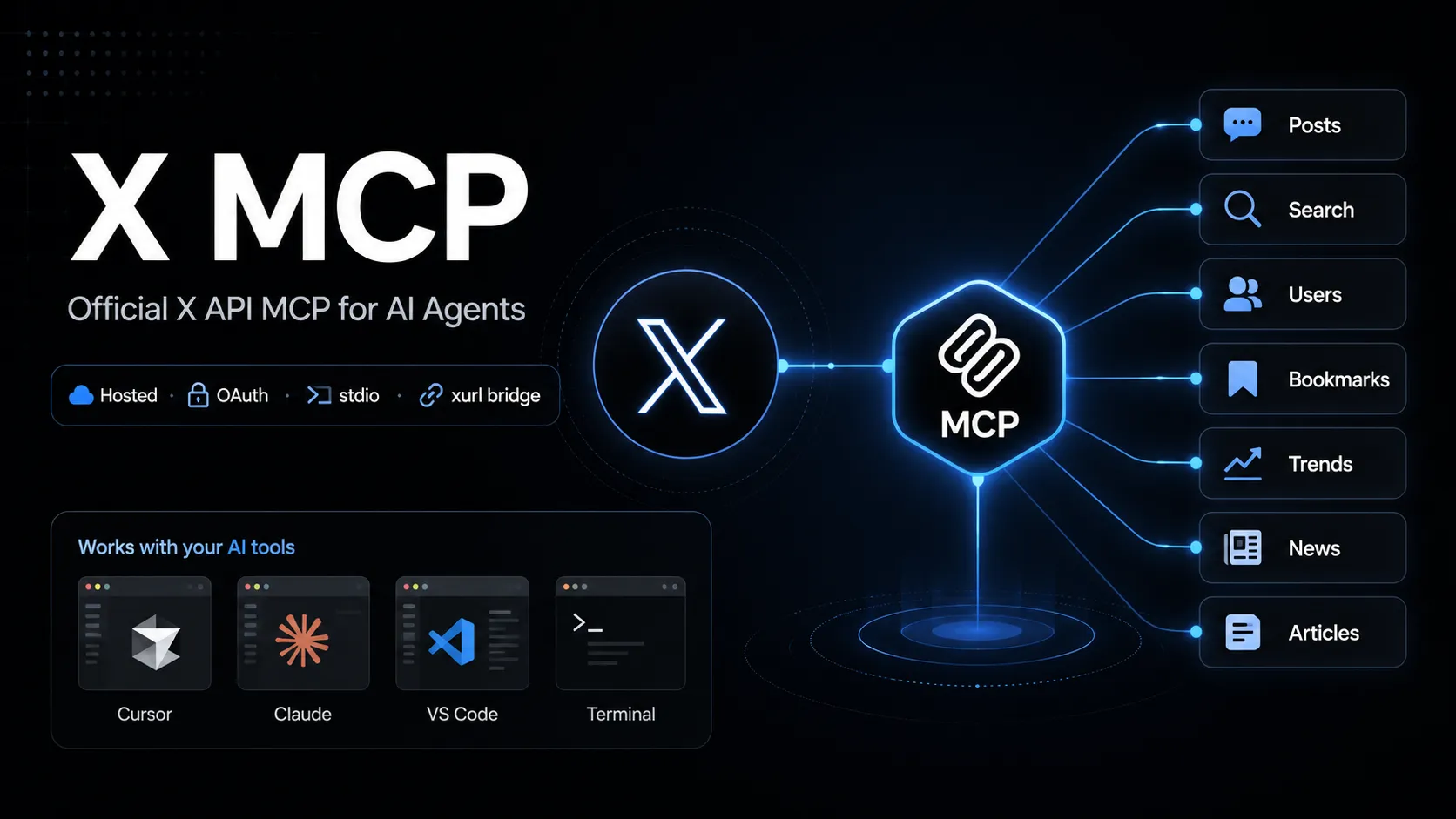
X MCP は、MCP 互換の AI ツールから X API エンドポイントを呼び出すための、X 公式のホスト型 Model Context Protocol サーバーです。xurl ブリッジを通じて OAuth のユーザーコンテキストを扱い、投稿検索、ユーザー検索、ブックマーク、トレンド、ニュース、Articles などのワークフローに利用できます。
About
X MCP は、MCP 互換の AI ツールを X API に接続するための、X 公式ホスト型 MCP サーバーです。X のドキュメントでは API MCP エンドポイントが https://api.x.com/mcp と示されており、ローカルの stdio クライアントは通常、オープンソースの xurl mcp ブリッジ経由で接続します。
このエントリーは X API MCP サーバーを対象としており、ドキュメント検索用の X Docs MCP や、類似名のコミュニティ製 Twitter/X MCP プロジェクトとは別物です。
Key Features
- MCP 互換ツールから、ユーザーの X アカウント権限で X API 機能を呼び出せます。
- 公式ドキュメントで示される機能領域には、posts、full-archive search、user search、user lookup、timelines、mentions、bookmarks、bookmark folders、news、trends、Articles が含まれます。
xurlにより OAuth 2.0 のユーザーコンテキスト認証、トークンキャッシュ、トークン更新を行います。- 静的 Bearer token を付与できるクライアント向けに、読み取りエンドポイント用の app-only direct URL モードも説明されています。
Use Cases
- ライブの X 検索やユーザーコンテキストを必要とするソーシャルリスニングや調査ワークフロー。
- ブックマーク管理、タイムライン参照、mentions の確認、Article 下書きなどのエージェント補助。
- X の公式ドキュメントで説明されている API 面に接続したまま、AI ツール内で X API 操作を素早く試作できます。
Setup or Requirements
X MCP には X Developer Platform アカウントと、OAuth を有効化した X app が必要です。詳細なコマンド、設定ブロック、認証フローは mcpSetup にまとめています。
Compatibility
X は Grok Build、Cursor、Claude Desktop、VS Code with GitHub Copilot Agent mode、および汎用 MCP クライアント向けの設定手順を文書化しています。確認した公式 X MCP ページでは、Claude Code、Codex、Windsurf、Lovable の個別公開設定手順は確認できませんでした。
Limitations
ホスト型 X API MCP サーバーは、X API アクセス、app 設定、OAuth scopes、レート制限、アカウント権限に依存します。一部の操作では特定の API package、Production environment enrollment、適切な scopes が必要になる場合があります。
公式ページは機能領域と設定方法を説明していますが、公開されるすべての MCP tool 名の安定した完全リストは確認できませんでした。
Sources
- Official X MCP documentation: https://docs.x.com/tools/mcp
- X Agent Resources: https://docs.x.com/tools/ai
- xurl GitHub repository: https://github.com/xdevplatform/xurl
- X API OpenAPI specification: https://api.x.com/2/openapi.json
MCP Setup
Prerequisites
- Node.js installed for npx
- X Developer Platform account
- OAuth 2.0-enabled X app
- Redirect URI registered on the X app, default http://localhost:8080/callback
- CLIENT_ID and CLIENT_SECRET from the X app
Access requirements
- First-run OAuth 2.0 browser sign-in for user-context access
- xurl caches and refreshes tokens under ~/.xurl
- X API access, scopes, app package, environment, and rate limits apply
- App-only direct URL mode is documented for read endpoints only
Companion app or plugin
Name: xurl CLI / @xdevplatform/xurl Install URL: https://github.com/xdevplatform/xurl
- Use npx in the MCP client config, or install xurl with Homebrew, npm, shell script, or Go.
- Run xurl mcp as the local stdio bridge to https://api.x.com/mcp.
xurl handles OAuth, token caching, token refresh, and Bearer-token injection for the hosted X MCP endpoint.
Client setup
Grok Build
Transport: stdio
grok mcp add xapi npx -e CLIENT_ID=YOUR_X_APP_CLIENT_ID -e CLIENT_SECRET=YOUR_X_APP_CLIENT_SECRET -- -y @xdevplatform/xurl mcp https://api.x.com/mcp
[mcp_servers.xapi]
command = "npx"
args = ["-y", "@xdevplatform/xurl", "mcp", "https://api.x.com/mcp"]
enabled = true
startup_timeout_sec = 300

[mcp_servers.xapi.env]
CLIENT_ID = "YOUR_X_APP_CLIENT_ID"
CLIENT_SECRET = "YOUR_X_APP_CLIENT_SECRET"
- Run the documented grok mcp add command or edit ~/.grok/config.toml.
- Verify with grok mcp doctor xapi and grok mcp list.
Auth:
- Complete the first-run X OAuth browser login.
Documented by X for Grok Build.
Cursor
Transport: stdio
npx -y @xdevplatform/xurl mcp https://api.x.com/mcp
{"mcpServers":{"xapi":{"command":"npx","args":["-y","@xdevplatform/xurl","mcp","https://api.x.com/mcp"],"env":{"CLIENT_ID":"YOUR_X_APP_CLIENT_ID","CLIENT_SECRET":"YOUR_X_APP_CLIENT_SECRET"}}}}
- Create ~/.cursor/mcp.json or .cursor/mcp.json.
- Open Cursor Settings > MCP and confirm xapi is connected.
Auth:
- Complete the first-run X OAuth browser login.
Documented by X for Cursor.
Claude Desktop
Transport: stdio
npx -y @xdevplatform/xurl mcp https://api.x.com/mcp
{"mcpServers":{"xapi":{"command":"npx","args":["-y","@xdevplatform/xurl","mcp","https://api.x.com/mcp"],"env":{"CLIENT_ID":"YOUR_X_APP_CLIENT_ID","CLIENT_SECRET":"YOUR_X_APP_CLIENT_SECRET"}}}}
- Edit claude_desktop_config.json and restart Claude Desktop.
Auth:
- Complete the first-run X OAuth browser login.
Documented by X for Claude Desktop.
VS Code
Transport: stdio
npx -y @xdevplatform/xurl mcp https://api.x.com/mcp
{"servers":{"xapi":{"type":"stdio","command":"npx","args":["-y","@xdevplatform/xurl","mcp","https://api.x.com/mcp"],"env":{"CLIENT_ID":"YOUR_X_APP_CLIENT_ID","CLIENT_SECRET":"YOUR_X_APP_CLIENT_SECRET"}}}}
- Add the server to .vscode/mcp.json for GitHub Copilot Agent mode.
Auth:
- Complete the first-run X OAuth browser login.
Documented by X for VS Code with GitHub Copilot Agent mode.
Claude Code
Exact public Claude Code setup is not documented on the checked official X MCP page.
Codex
Exact public Codex setup is not documented on the checked official X MCP page.
Windsurf
Exact public Windsurf setup is not documented on the checked official X MCP page.
Lovable
Exact public Lovable setup is not documented on the checked official X MCP page.
Other
Transport: stdio
npx -y @xdevplatform/xurl mcp https://api.x.com/mcp
{"mcpServers":{"xapi":{"command":"npx","args":["-y","@xdevplatform/xurl","mcp","https://api.x.com/mcp"],"env":{"CLIENT_ID":"YOUR_X_APP_CLIENT_ID","CLIENT_SECRET":"YOUR_X_APP_CLIENT_SECRET"},"startup_timeout_sec":300}}}
- Use the universal stdio MCP configuration in any compatible client.
- Set startup timeout to 300 seconds or more if supported.
Auth:
- Complete the first-run browser OAuth flow.
- For headless machines, authenticate first with xurl auth oauth2 --headless.
If xurl is installed natively, X documents replacing command npx with command xurl and args ["mcp", "https://api.x.com/mcp"].
Other
Transport: HTTP
{"mcpServers":{"xapi_direct":{"url":"https://api.x.com/mcp","headers":{"Authorization":"Bearer YOUR_APP_ONLY_BEARER_TOKEN"}}}}
- Use only with MCP clients that support remote MCP endpoints with custom headers.
Auth:
- Provide an app-only Bearer token from the X Developer Platform.
Read-endpoint trade-off: no auto-refresh and no user context. The xurl bridge is recommended for full functionality.
Authorization flow
- Create an OAuth 2.0-enabled X app in the X Developer Portal.
- Register http://localhost:8080/callback or set and register REDIRECT_URI.
- Set CLIENT_ID and CLIENT_SECRET in the MCP client environment or register them in xurl.
- Start the MCP client and complete the one-time browser OAuth flow.
- For headless hosts, run xurl auth oauth2 --headless first.
Environment variables
CLIENT_IDCLIENT_SECRETREDIRECT_URI optionalAUTH_URL optionalTOKEN_URL optionalAPI_BASE_URL optionalINFO_URL optional
Setup docs: https://docs.x.com/tools/mcp
Tags
Alternatives
Comparable tools and resources explicitly connected to X MCP.
Related Entries
Keep exploring similar tools and resources in this category.

Hyper3D MCP
MCP ServersHyper3D MCP is Hyper3D's hosted Rodin MCP server for creating 3D assets from natural-language instructions or supported references, checking asynchronous generation progress, and retrieving model download links inside AI coding clients. Official setup is documented for Codex, Claude Code, and Kimi Code CLI.





Related Reads
Background, tutorials, and protocol context connected to this entry.